

This guide explains how calls are handled between CloudTalk and Odoo, and how call details such as notes, tags, and recordings are automatically synced to the correct contact or opportunity.
Calling from Odoo
With the click-to-call functionality enabled, phone numbers in the Contacts or Opportunities view become clickable, allowing you to initiate calls directly from Odoo via CloudTalk. Phone numbers in the Opportunities or Contacts view will show as clickable links:- Clicking a number opens a CloudTalk call interface (or launches your CloudTalk Phone app)
- Calls placed this way are tracked and logged in both systems
- You’ll see the CloudTalk phone icon next to numbers

Contact Sync
After connecting Odoo and CloudTalk, your CRM contacts are automatically synced into CloudTalk. This means:- Agents can start dialing from an up-to-date list
- Caller info is matched in real time
- Duplicate data entry is avoided
Call Logging & Export
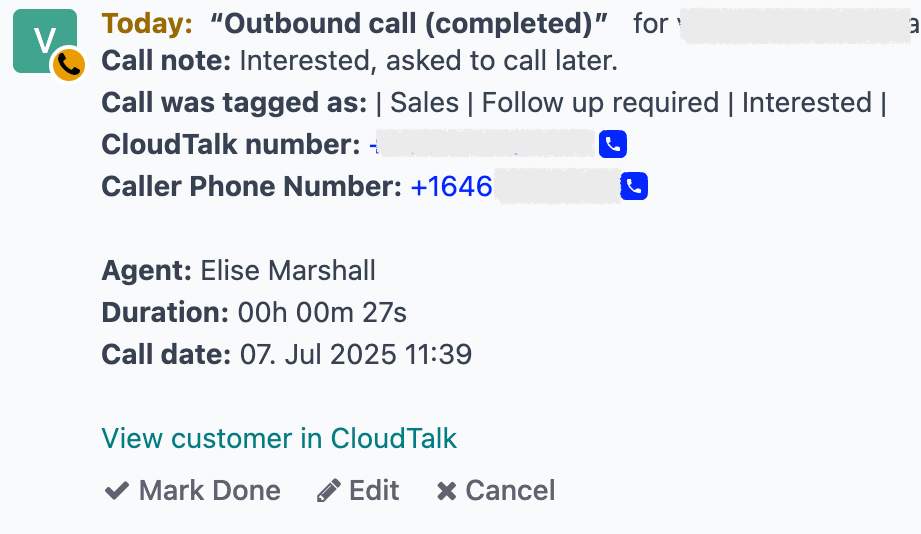
Each call placed or received in CloudTalk is automatically logged to the corresponding contact, lead, or opportunity in Odoo CRM. Logged details include:- Call direction and duration
- Notes
- Tags
- Agent name
- Call outcome (missed, answered)
- Recording links (if enabled)
Real-Time Note & Tag Sync
Notes and tags created in CloudTalk sync to Odoo in real time:- When you add a note in CloudTalk, it appears on the related Odoo activity.
- When you edit or delete a note or tag in CloudTalk, the changes are reflected in Odoo automatically.
Need help or have a question? Just reach out through our Support portal — we’re here for you.