

We’ve rebuilt the AI Sales Dialer. From 28 September 2026, the new version is available alongside your current dialer. Here’s what’s different, what to do with your campaigns, and how to end up on a single dialer.
What you’ll have: find your situation
Where to find it
-
In the CloudTalk Phone app, tap the Dialer button under Campaign dialers. If your account has both the legacy and the new dialer, a picker appears with two options:
- Dialer (“What you use today”): your current legacy dialer
- Dialer with a New badge (“Try the new dialer”): the rebuilt AI Sales Dialer
Select the one with the New badge to open the rebuilt dialer.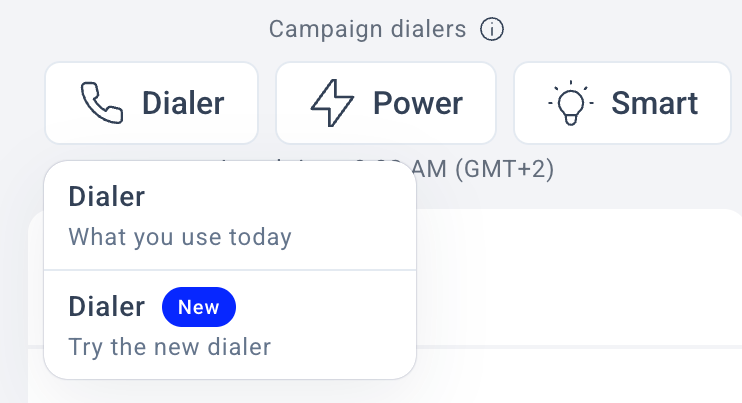
- In the Dashboard: your Campaigns section now shows both a current and a rebuilt campaigns area. Create new campaigns in the rebuilt area.
What to do with your campaigns
⚠️ Campaigns don’t move between the two dialers. There’s no migration or import.
- Let running campaigns finish where they are, on your current dialer. Nothing is deleted.
- Create new campaigns in the rebuilt dialer. Your contacts, tags and CRM connections are already there, so you just recreate the campaign pointing at the same tags/lists.
- A recreated campaign starts fresh: every contact is dialed again (past call attempts don’t carry over). Plan for this.
- Both dialers run side by side through the whole transition; agents only see campaigns assigned to them.
- Never-ending campaign (one you keep topping up)? Either let it wind down and start fresh, or recreate it now knowing everyone gets re-dialed.
- Your old reports, recordings and stats stay in the current dialer’s views and remain exportable until it’s retired. Export anything you want to keep before then.
Why we rebuilt it, and what’s new
We rebuilt the AI Sales Dialer to fix long-standing problems with data accuracy and reliability. In the new version, call attribution and reporting are correct from the start (no more mismatched stats), exports actually work on large campaigns, dispositions can’t get double-counted on a retry, two agents will never get the same contact, and if something interrupts a session, the dialer picks up where it left off. Your team gets the same interface they’re used to, plus everything below.Setting up and running campaigns
- Account-level dispositions. Set up your dispositions once and reuse them across campaigns. No more recreating the same set every time.
- Contact-source prioritization. Add CRM lists and tags to one campaign, then drag them into the order you want. Change it any time, even mid-campaign.
- Prioritize fresh contacts. A toggle in campaign settings. Turn it on to dial new contacts before retrying earlier no-answers. With it off (the default), the order is: favorites, rescheduled, retries, then fresh.
- Multi-number dialing. If a contact has more than one number, the dialer works through them across retries. Still counted as one contact.
- Contact lock settings. Choose how long a contact stays locked to one agent before going back to the shared queue.
- Rebuilt statistics. Numbers you can trust. The stats backend was rewritten so what you see in the campaign always matches what actually happened.
- Campaign details on one screen. Setup, progress, and live state are all visible without switching views. Progress tracks contacts fully worked, not just call attempts.
On the call
- Recording controls during the call. Start, pause, and stop recording without leaving the call screen.
- Contact local time. See what time it is for the contact before you dial.
- All three transfer types. Warm, safe, and cold. Notes and the call outcome travel with the transfer. Safe transfer brings the call back to you if the colleague doesn’t pick up.
- Scheduled callbacks. Pick a date and time, add a note. The contact comes back to your queue when it’s due. You can also dial a scheduled callback early.
- Notes on every call. Not just callbacks. Every call gets a notes field that saves with the outcome.
- Scripts and surveys during the call. The script and survey tabs sit right next to the call summary. Required survey questions block wrap-up until they’re answered, and responses sync to your CRM.
- Caller ID visible on every dial. You can see which outbound strategy and number the dialer is using.
Campaigns via Public API
- Full campaign management through a documented Public API. Revamped and extended with new endpoints.
Getting to a single dialer
- You don’t have to run two dialers forever. Once you’ve moved over and no longer need the legacy dialer, just tell us and we’ll switch it off for you so you have a single dialer. Contact your Account Manager, or our support team if you don’t have one.
- We’ll retire the legacy dialer for everyone later. There’s no final date yet. You’ll hear it from us well in advance, and nothing is turned off without notice.
Need help or have a question? Just reach out through our Support portal. We’re here for you.