

Explore how calls are handled and how information is synced between CloudTalk and Zoho Desk.
Calling from Zoho Desk
Make outbound calls
With Click-to-Call enabled, phone numbers in Zoho Desk become clickable, allowing agents to initiate calls directly through CloudTalk. When a phone number is clicked:- CloudTalk Phone opens and initiates the call.
- The call is associated with the corresponding Zoho Desk Customer if the contact exists
Receive inbound calls
Inbound calls are received through the CloudTalk Phone app. If the caller matches an existing Zoho Desk Customer:- The call will be associated with that customer
- A Zoho Desk ticket will be created after the call
Call logging and data exchange
The Zoho Desk integration synchronizes contacts and automatically creates tickets based on calls and SMS activity.Contact Sync
CloudTalk and Zoho Desk synchronize customer records so agents can see contact details when handling calls.Zoho Desk → CloudTalk contact import
Customers from Zoho Desk are automatically imported into CloudTalk as contacts. If multiple Zoho Desk customers share the same phone number, email address, or name, CloudTalk merges them into a single contact. For details, see our guide: How CloudTalk Merges Contacts.Zoho Desk → CloudTalk contact updates
When a Zoho Desk Customer is created or updated, the corresponding CloudTalk contact is created or updated automatically. The following information can be synchronized:
The following Zoho Desk fields are not synchronized with CloudTalk:
- Tags
- Title
- Industry
- Website
- Address
- City
- Zip
- State
- Country
- Favorite agent
CloudTalk → Zoho Desk contact creation
When a CloudTalk contact is created or updated, the integration creates a new Zoho Desk customer if no matching record exists.Call Logging & Export
CloudTalk calls can automatically create tickets in Zoho Desk. Each call generates a Zoho Desk ticket containing the call details.Call ticket data
The following information is exported when a call ticket is created:
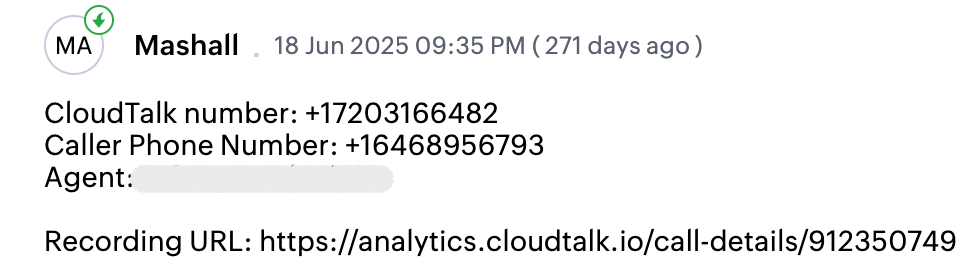
Additional call details are included in the ticket description, such as:
- CloudTalk number
- Caller phone number
- Assigned agent
- Recording URL
- If custom field mapping is configured, selected data can also be stored in Zoho Desk custom fields.
Ticket association
Each ticket created by CloudTalk is linked to the corresponding Zoho Desk customer. All tickets associated with a customer are displayed in CloudTalk as contact activities. Each activity includes:- Ticket link
- Subject
- Ticket status
- Ticket type
SMS Logging
Incoming and outgoing SMS messages can also create tickets in Zoho Desk. Each SMS conversation generates a new Zoho Desk ticket.Need help or have a question? Just reach out through our Support portal — we’re here for you.