

Learn how to use Zendesk Sell together with CloudTalk to initiate calls and access customer information.
Calling from Zendesk Sell
Make outbound calls
With Click-to-Call enabled, all phone numbers in your Zendesk Sell account will be converted into a clickable format and you can easily initiate calls with a single click. You can initiate outbound calls directly from:- Contact profiles
- Lead profiles
- Other supported Zendesk Sell objects
Receive inbound calls
When receiving a call, you can open the caller’s Zendesk Sell profile with a single click, even before picking up the call. Based on stored information such as notes, files, and previous calls, you can provide more accurate and personalised service.Call logging and data exchange
Contact sync
Once the Zendesk Sell integration is enabled and saved in CloudTalk, contacts are automatically synchronized between both systems. Changes made to a contact’s email address or phone number in either system are automatically reflected in the other.Synchronized fields
- Name
- Email addresses
- Phone numbers
- Contact tags
- Contact address
Lead handling
Zendesk Sell leads are imported into CloudTalk as leads. However, they are not visible in the contact list in CloudTalk, as they are not yet converted into contacts. Leads remain in this state until:- The lead is converted into a contact in Zendesk Sell
- After having a call with the lead, the user saves this number as a contact in CloudTalk
Synchronized fields
- Email addresses
- Phone numbers
- Contact tags
- Contact address
Call logging & association
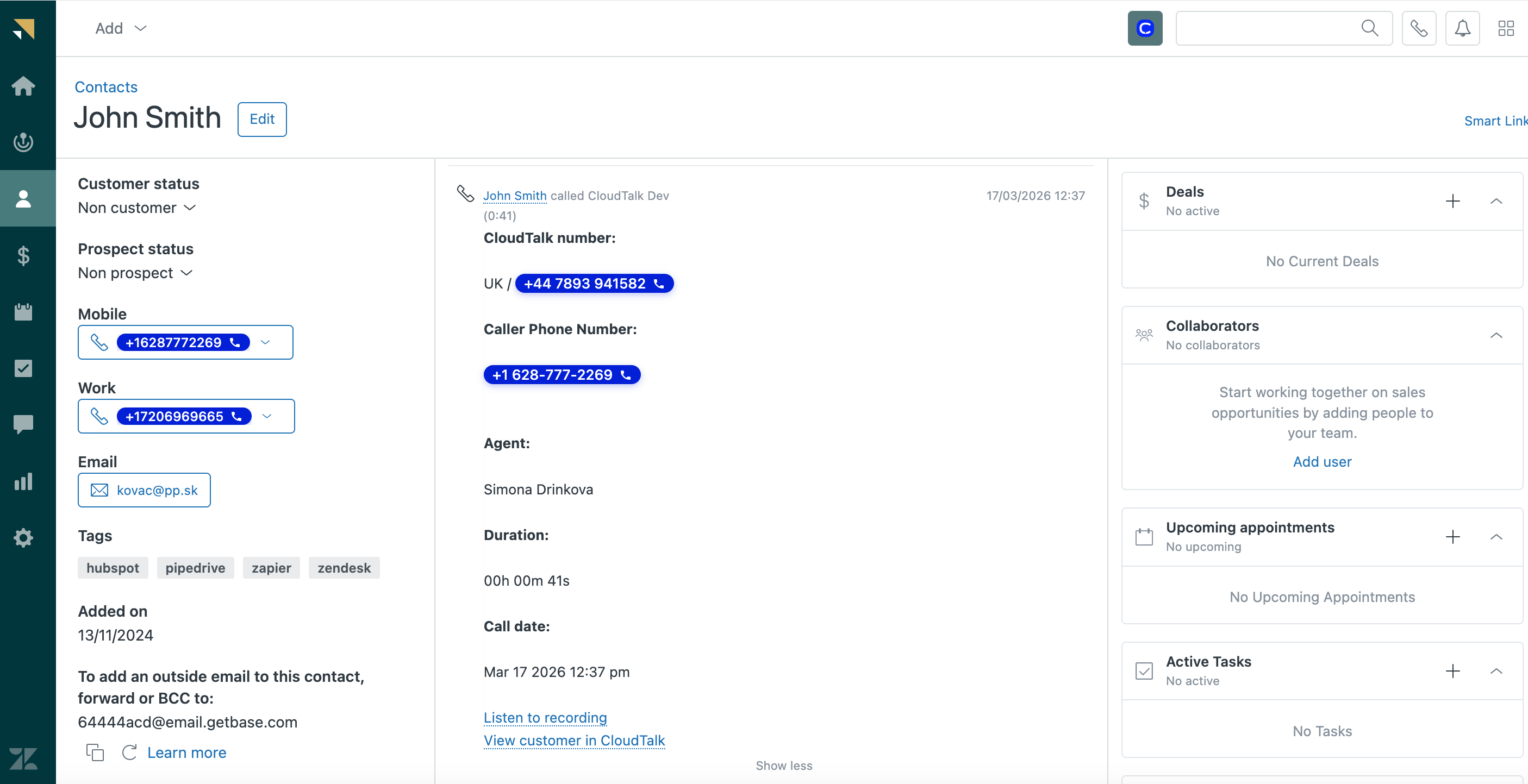
Call logs are only created for Zendesk Sell contacts. Calls made to leads are not logged in Zendesk Sell. After the call ends, you can add notes, assign tags, and evaluate the call in CloudTalk. This information is not synced to Zendesk Sell. If a phone number does not match an existing contact, you can configure whether a new contact is created in Zendesk Sell. Once the call is completed, it is logged in Zendesk Sell within the contact’s activity timeline. You can also view call logs in the Activity Feed. The call log includes details such as:- Call direction
- Call duration
- CloudTalk number
- Caller phone number
- Agent name
- Call date
- Link to call recording
- Link to view the customer in CloudTalk
Need help or have a question? Just reach out through our Support portal — we’re here for you.