

In this article, you’ll discover how easy it is to order phone numbers directly from the CloudTalk dashboard. Whether you’re expanding into new markets or scaling fast, this guide will show you how to get the numbers, when you need them.
Numbers in CloudTalk
The phone numbers you use play a crucial role in your business. In many cases, a potential customer’s first impression comes from the phone number they see on an incoming call. An unfamiliar country code can often be a reason for someone to ignore the call. With CloudTalk, you can acquire phone numbers from various countries and regions, all within a single platform, to give your company a localized presence for your customers. During your free trial, you’ll automatically receive a testing number, and subscribers can request to exchange or add numbers at any time directly through the dashboard.Getting a number for your account
CloudTalk offers two streamlined flows to help clients order numbers with ease:- Instant number ordering – For countries eligible for instant setup (including the US, Canada, and additional countries where no documents are required), and for countries where your regulatory documents have already been approved, numbers can be purchased and activated directly from the dashboard with no extra steps.
- Assisted number ordering – For countries that require additional documentation or have local restrictions, numbers are assigned manually by our team.
Instant number ordering
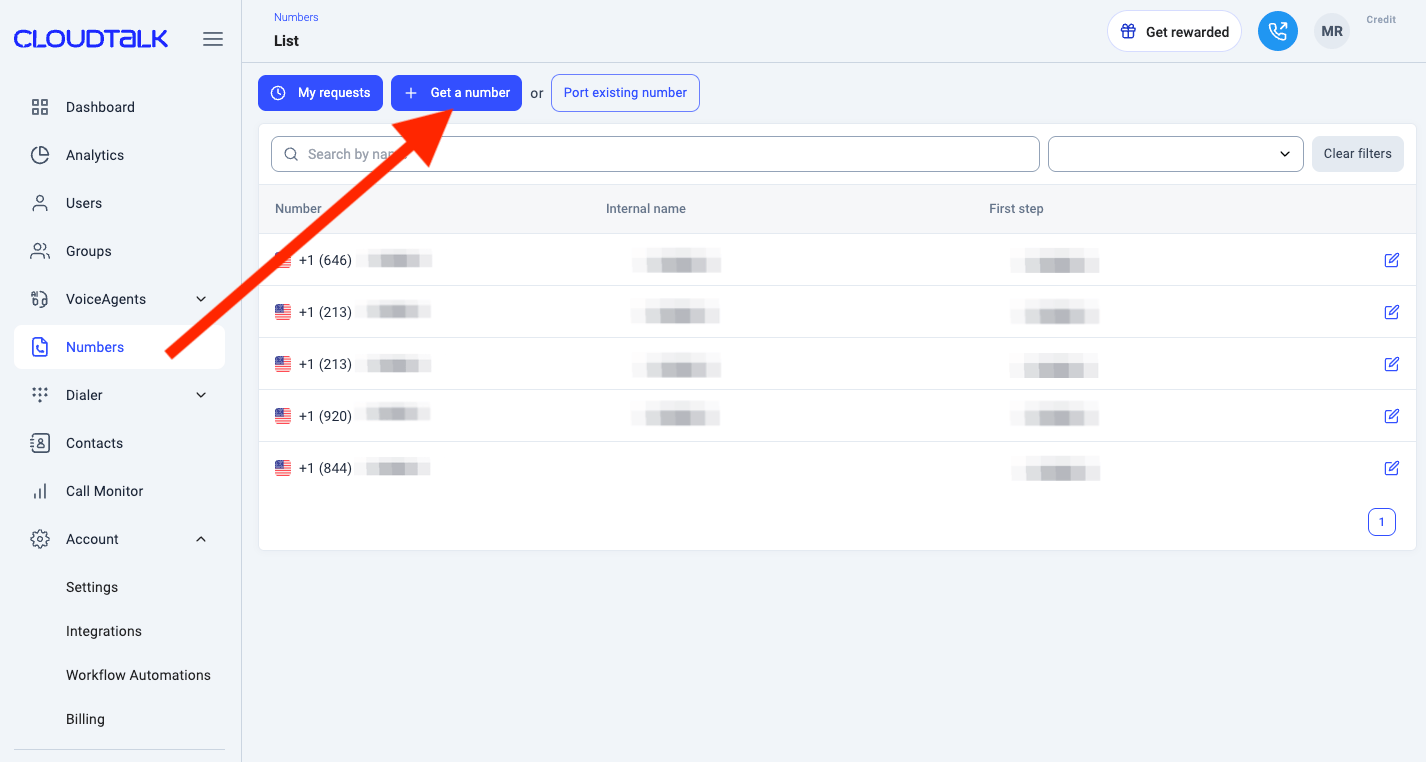
In case the country is eligible for instant setup, after selecting respective country, you will be redirected to “Pick a Number” step of number ordering flow.- From your Cloudtalk Dashboard, open the Numbers section and click Get a number.
-
Choose the country you need a number for.
Note: In case country is not eligible for instant set up, you will be redirected to request for assisted number ordering flow.
-
View available numbers. On the “Pick a Number” step, you’ll see a list of numbers for the country you chose earlier. Each one shows the area code, whether it supports SMS or MMS, and the pricing, including monthly price and activation fee.
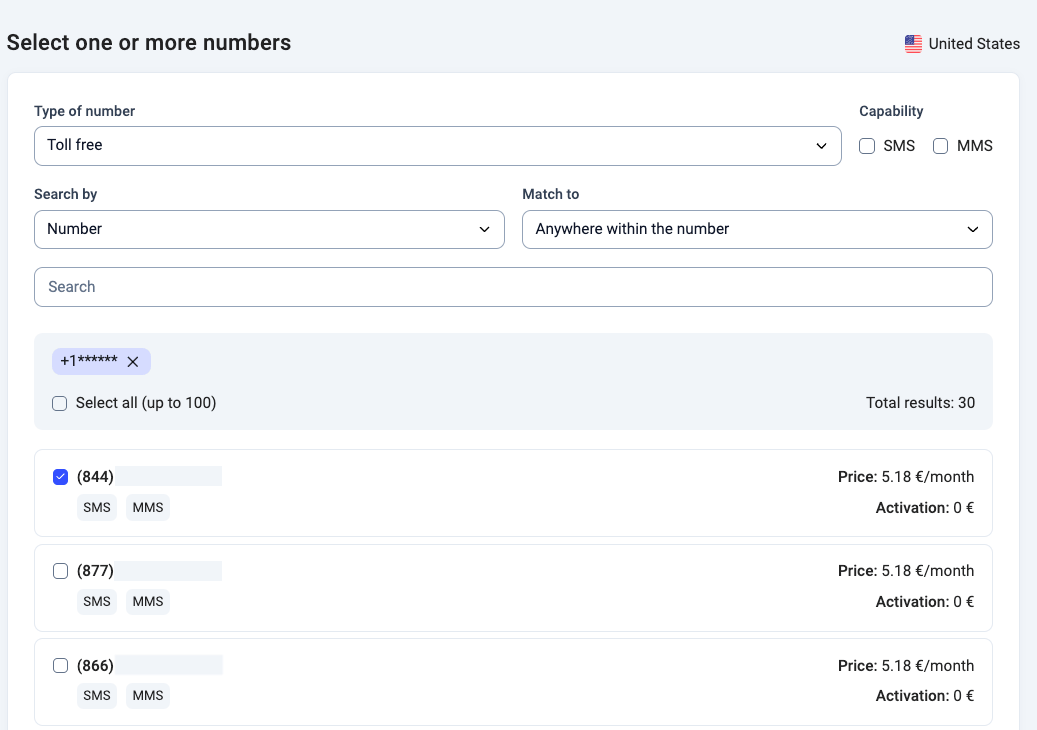
- By default, the list displays Toll-free numbers. If you’re looking for other types of phone numbers, like Local or Mobile numbers, simply use the Type of Number filter to select the option you need.
- To show only SMS- or MMS-capable numbers, use the Capability filter and select the relevant options.
-
For more precise results, you can further filter numbers by:
- Custom number string (e.g. digits you want to include)
- Locality
- Area code
- Region
-
Select the numbers you want to include in your order and click
Nextto proceed to the summary screen. -
Make sure everything looks right in your order summary. If everything looks good, click
Purchaseto finish your order.
Which countries and number types support instant ordering?
The table below shows which number types you can order instantly. “Instant (first number)” means you can order and activate it right away with no documents. For the others, your first number requires document review; once approved, you can order more of that type instantly.
For the documents required per country and number functionality, see Phone Number Coverage, Requirements, and Functionality.
Ordering more numbers of a type that isn’t in this table (for example, Brazil Mobile)? Use assisted number ordering. You don’t always have to upload your documents again: documents your company provided on an earlier completed order are shown as Previously submitted, and you can reuse them for the new request. Our Numbers team then checks whether they cover the new numbers, and lets you know if anything else is needed.
Cancel a number request
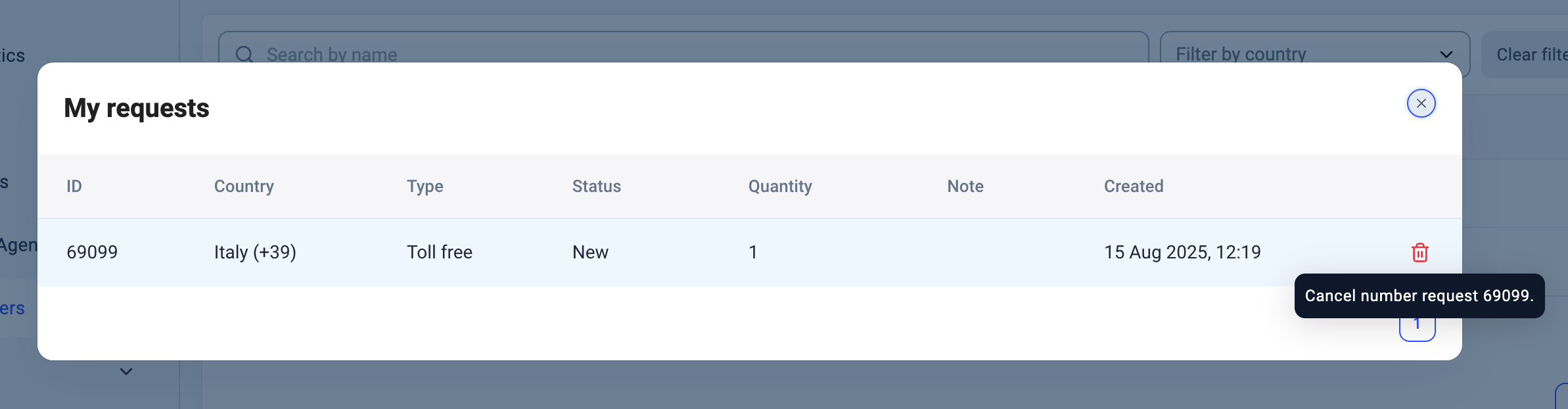
If you’ve submitted a number request but no longer need it, you can cancel it directly in your CloudTalk Dashboard.- From your Dashboard, go to Numbers > Number requests.
- Locate the request you want to cancel.
- Click the bin icon next to the request.
- Confirm your choice in the pop-up window.
- Only users with Admin or Account Manager roles can cancel requests.
- If the number has already been activated and billed, you’ll need to contact our Support Team to remove it from your account instead.
Assisted number ordering
If the country requires additional documentation or isn’t eligible for instant number setup, you’ll be redirected to a form to submit your request. The CloudTalk Numbers Team will review and process it manually.-
From your Cloudtalk Dashboard, open the Numbers section and click Get a number.
- Choose the country you need a number for. Note: In case country is eligible for instant set up, you will be redirected to request to Instant number ordering flow.
-
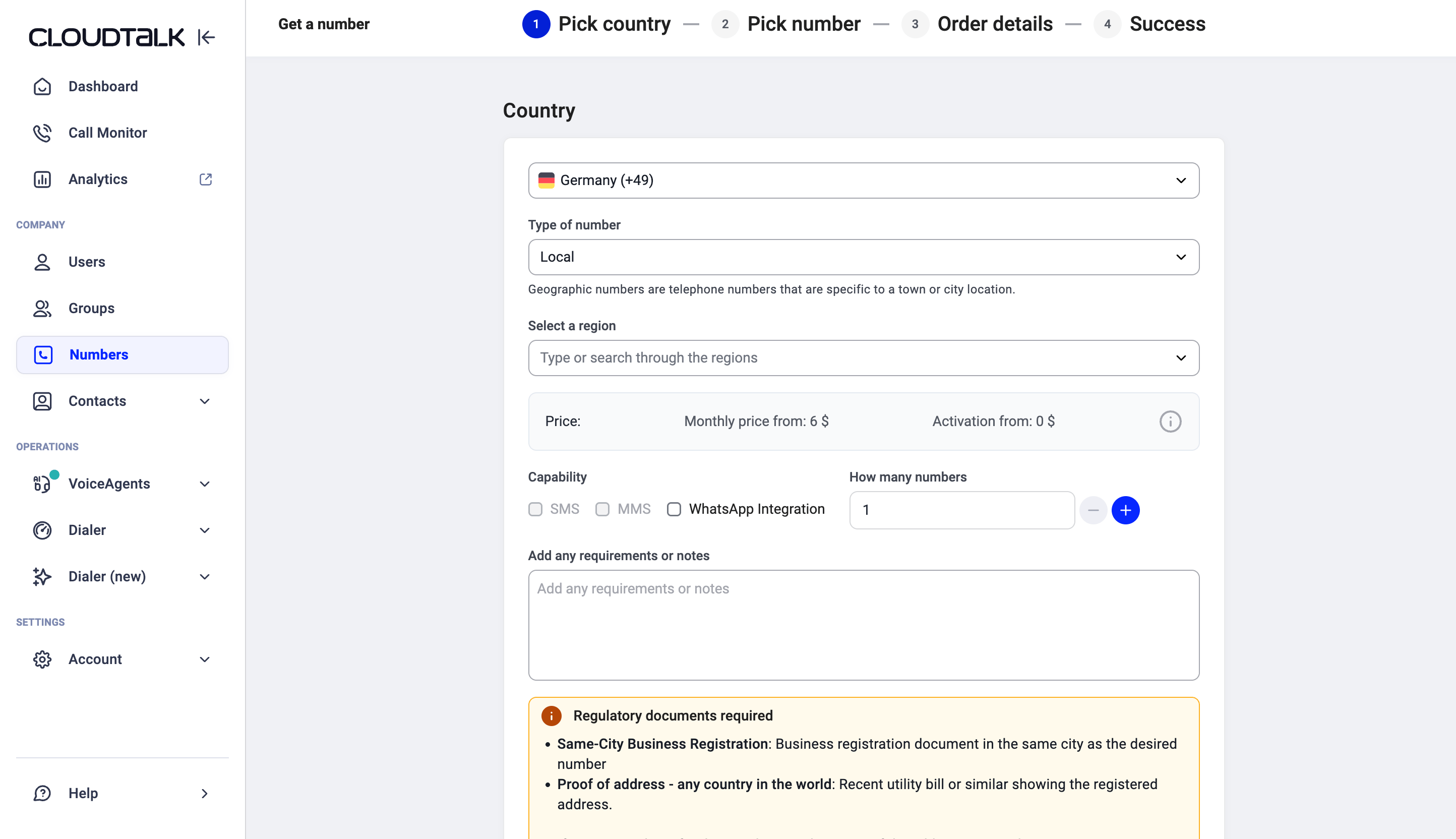
Select the type of number you need. A Regulatory documents required box then lists the documents and details needed for that exact country and number type. If the box doesn’t appear, no documents are needed.
-
Click Next. On the Provide the required documents screen, fill in each required field and upload each document (drag and drop, or click Browse). Required items are marked with a red asterisk.
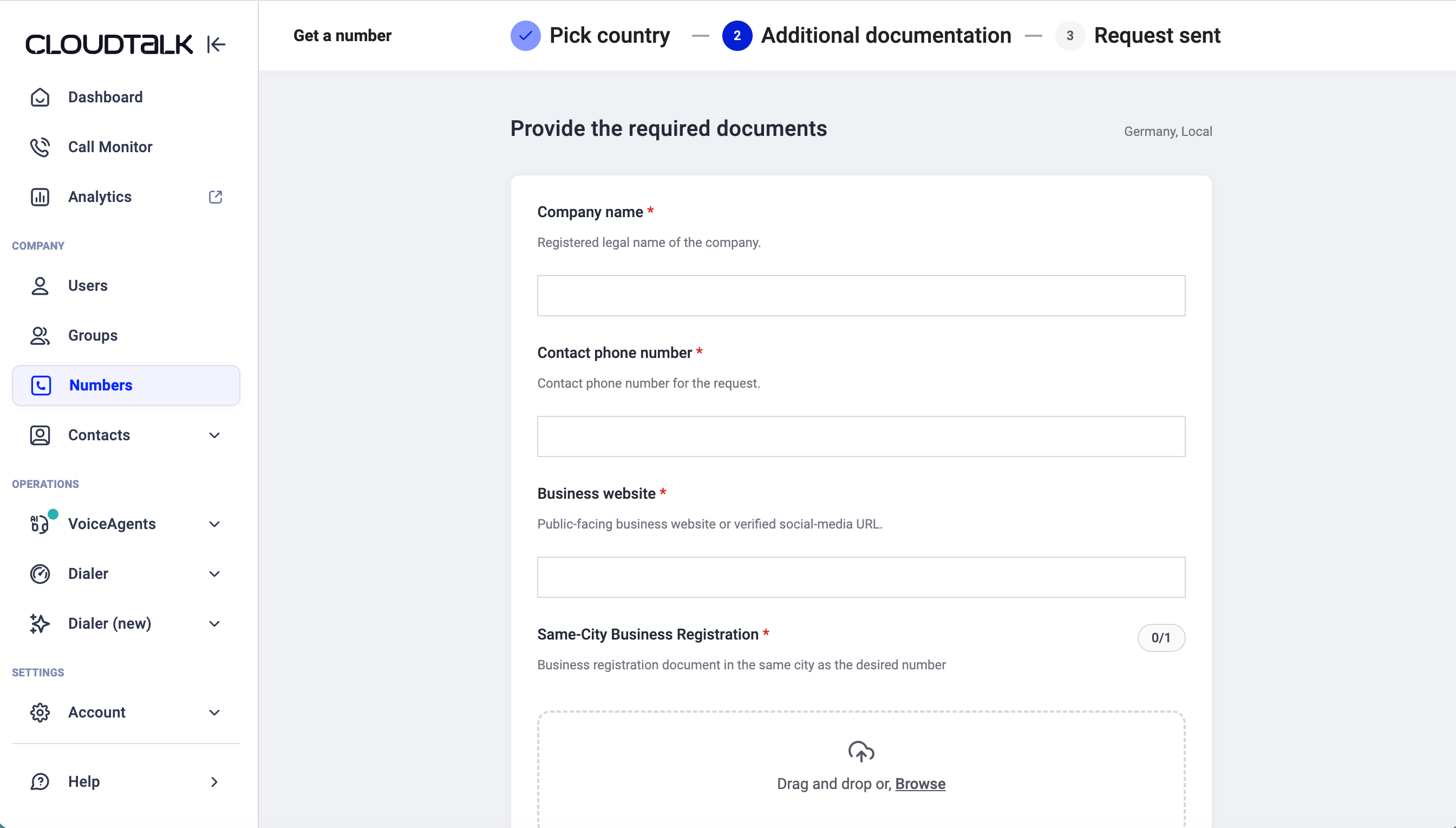
- Fields are checked as you fill them in, so you can fix a wrong format before you submit.
- Documents your company provided on an earlier completed order are marked Previously submitted. You can preview them and reuse them instead of uploading them again.
- Tick the consent box to let CloudTalk process your documents, then click Send request.
-
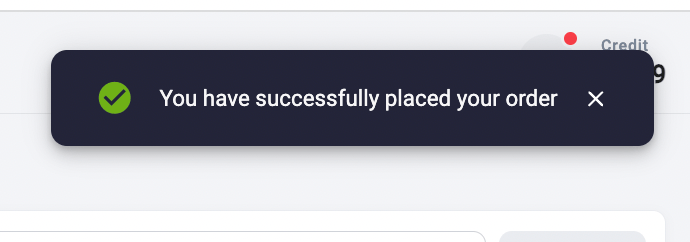
You will see an order confirmation banner in the top corner after sending your request, and receive a confirmation to your account email address.
- Our Numbering Support Team will review your request and either add the number or follow up in the confirmation email if we need any additional documents or information from you.
- Our Numbering Support Team will add the number to your account, add billing for the number, and send a final confirmation email.
On a free trial? Some numbers take 14 or more business days to deliver. If you order one of these during your trial, we accept the order but hold it until you upgrade to a paid plan. If your trial ends without an upgrade, the order is cancelled automatically.
Track your number request status
Did you know? You can check the status of your number requests anytime in the Numbers section under Number requests. Here’s what each status means:Obtaining vanity numbers
If you want a number that spells your company name or has repeating, easy-to-remember digits, CloudTalk will do our best to help you get it, in case numbers could not be obtained through Instant number ordering flow. Sometimes we may already have a suitable number available. If not, we’ll reach out to our vendors to request a custom number for you. Please note:- These special numbers can take extra time to get.
- Vendors may charge an admin fee, but you’ll only pay if we find a number you like and want to keep.
- CloudTalk does not add any extra fees to this service.
Need help or have a question? Just reach out through our Support portal — we’re here for you.