

This article explains how the CloudTalk + Greenhouse integration works and what data is synced between the two platforms after setup.
Call Logging and Data Exchange
Contact Sync
When the Greenhouse integration is configured, CloudTalk performs an initial import of all candidate records from Greenhouse. From that point, any updates made in Greenhouse are automatically reflected in CloudTalk. How sync works:- Candidates are imported with first name, last name, email, and phone number.
- Updates to candidate details in Greenhouse are reflected in CloudTalk, including the Created timestamp on new records.
- Removing a candidate in Greenhouse does not delete them in CloudTalk.
- Each candidate is linked to one main job listing. If a candidate is registered for a different job, Greenhouse creates a new candidate profile, which CloudTalk imports separately.
Call Logging & Export
After each call, CloudTalk automatically adds a note to the candidate’s profile in Greenhouse containing the following details. Call Field MappingSMS Logging
All inbound and outbound SMS messages sent through CloudTalk are logged to the candidate’s activity history in Greenhouse and linked to their primary job listing whenever possible.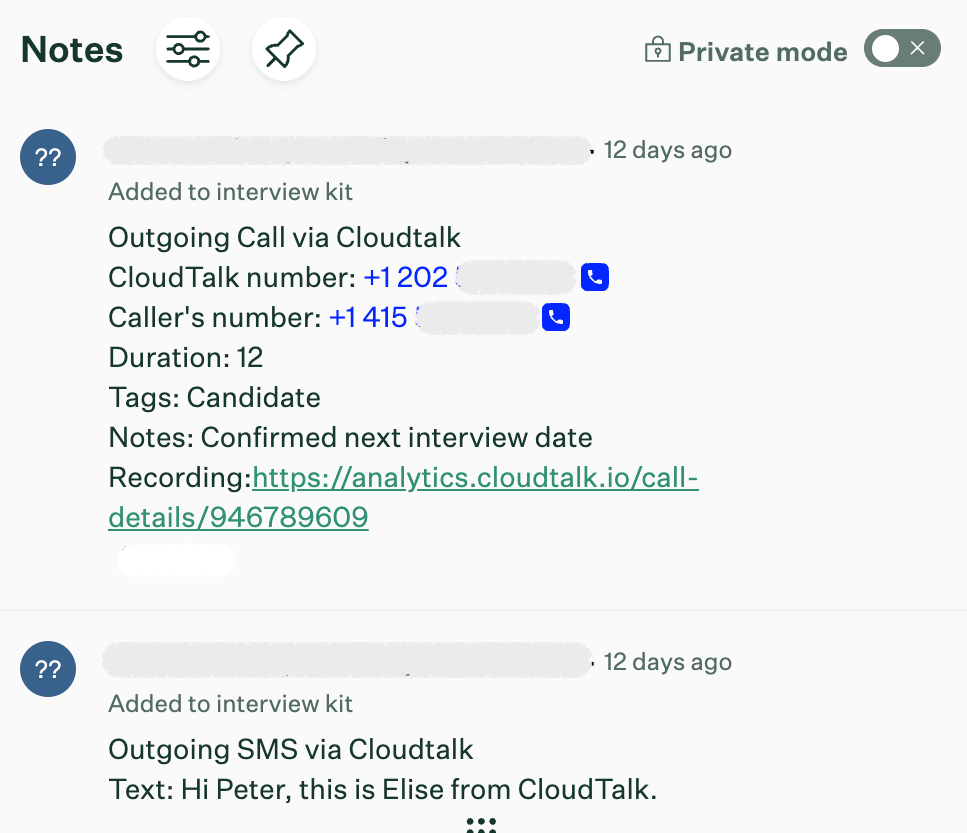
Need help or have a question? Just reach out through our Support portal — we’re here for you.