> ## Documentation Index
> Fetch the complete documentation index at: https://help.cloudtalk.io/llms.txt
> Use this file to discover all available pages before exploring further.
# ActiveCampaign configureren
> Configureer de gegevensuitwisseling tussen CloudTalk en ActiveCampaign zodat uw gegevens up-to-date blijven.
In dit artikel leert u hoe u ActiveCampaign koppelt aan CloudTalk, uw synchronisatie-instellingen configureert en de integratie loskoppelt indien nodig.
**Gebruikersniveau**: Admin
***
Vereisten
* Een [Essential, Expert of Custom](https://www.cloudtalk.io/pricing)-abonnement bij CloudTalk
* Een [ActiveCampaign](https://www.activecampaign.com)-accountbeheerder
* ActiveCampaign-account [API-sleutel en API-URL](https://help.activecampaign.com/hc/en-us/articles/207317590-Getting-started-with-the-API#how-to-obtain-your-activecampaign-api-url-and-key)
* Het e-mailadres dat u in CloudTalk gebruikt, moet exact overeenkomen met het e-mailadres in uw ActiveCampaign-account. Als de e-mailadressen niet overeenkomen, werkt de synchronisatie niet correct.
ActiveCampaign configureren
Zorg dat u de [API-sleutel en API-URL](https://help.activecampaign.com/hc/en-us/articles/207317590-Getting-started-with-the-API#how-to-obtain-your-activecampaign-api-url-and-key) van uw ActiveCampaign-account bij de hand hebt om te kopiëren en plakken.
1. Ga vanuit uw [Dashboard](https://dashboard.cloudtalk.io) naar **Account** > **Integraties**.
2. Beweeg in de lijst met integraties met de muis over **ActiveCampaign** en selecteer **`+ Toevoegen`**.
3. Selecteer in het gedeelte *Workflow-instellingen* **`New Authentication`**.
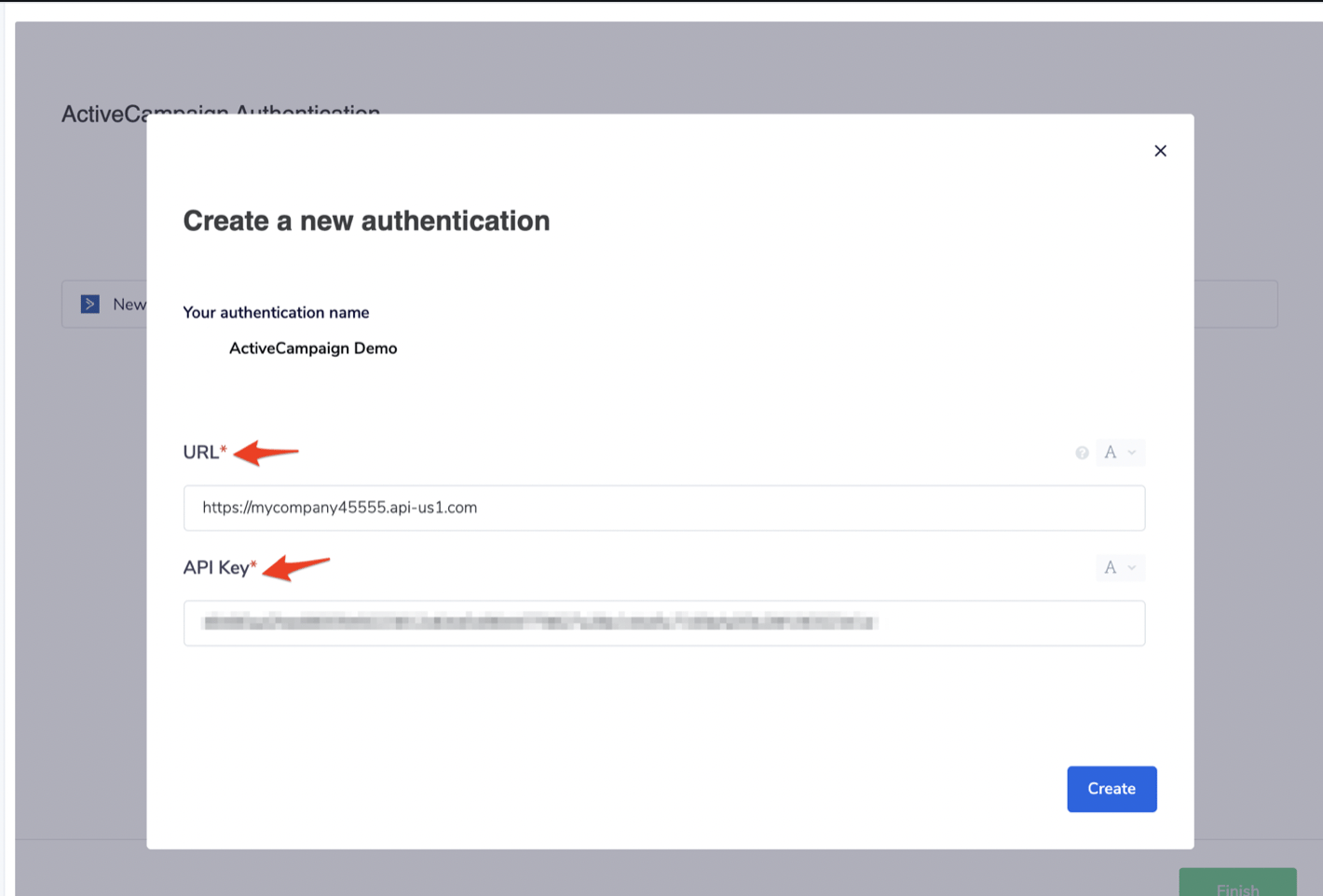
 4. Voer uw ActiveCampaign-**API-URL** en **API-sleutel** in. **`Aanmaken`**.
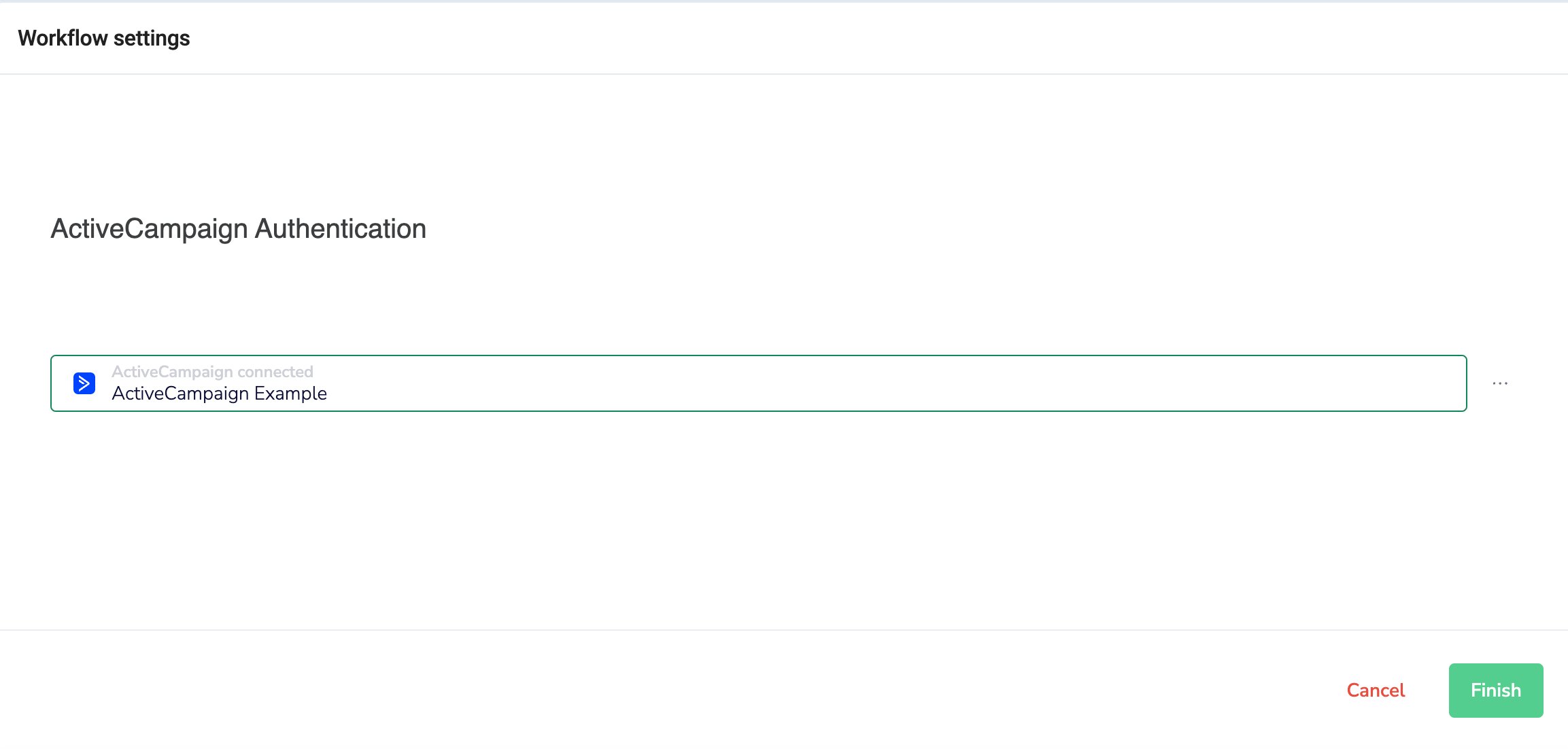
 5. Selecteer **`Voltooien`** in het gedeelte *Authenticatie* en **`Opslaan`** wanneer u klaar bent met het bewerken van uw workflow-instellingen.
Integratie aanpassen
* **Kies ervoor om alleen activiteit van bepaalde nummers te koppelen** aan uw ActiveCampaign-integratie via het gedeelte *Connected numbers*. Als dit gedeelte leeg wordt gelaten, worden gegevens van alle bedrijfsnummers gesynchroniseerd.

 * Specificeer een **Tag** voor uw ActiveCampaign-contacten in CloudTalk

Integratie loskoppelen of verwijderen
U hebt twee mogelijkheden als u de integratie niet meer wilt gebruiken:
* **Deactiveren:** Ga in uw CloudTalk Dashboard naar **Account > Integraties > ActiveCampaign** en zet de status op inactief. Dit onderbreekt de synchronisatie, maar behoudt uw instellingen.
 * **Verwijderen:** Om de integratie volledig te verwijderen, gaat u naar **Configureren > Integratie verwijderen**, typt u **DELETE** en bevestigt u.
 ***
*Hebt u hulp nodig of een vraag?* Neem gerust contact met ons op via ons [Supportportal](https://support.cloudtalk.io/hc/en-us/requests/new?ticket_form_id=26305535257884) — we staan voor u klaar.
## Related topics
- [Gegevenssynchronisatie met ActiveCampaign](/nl/articles/5639294-activecampaign-data-sync.md)
- [Integratiegids](/nl/articles/10570091-integrations-guide.md)
- [Close configureren](/nl/articles/13004211-configure-close.md)
This documentation is built and hosted on [Mintlify](https://mintlify.com), a developer documentation platform.
***
*Hebt u hulp nodig of een vraag?* Neem gerust contact met ons op via ons [Supportportal](https://support.cloudtalk.io/hc/en-us/requests/new?ticket_form_id=26305535257884) — we staan voor u klaar.
## Related topics
- [Gegevenssynchronisatie met ActiveCampaign](/nl/articles/5639294-activecampaign-data-sync.md)
- [Integratiegids](/nl/articles/10570091-integrations-guide.md)
- [Close configureren](/nl/articles/13004211-configure-close.md)
This documentation is built and hosted on [Mintlify](https://mintlify.com), a developer documentation platform.