> ## Documentation Index
> Fetch the complete documentation index at: https://help.cloudtalk.io/llms.txt
> Use this file to discover all available pages before exploring further.
# Een VoiceAgent-oproep starten vanuit Zendesk
> Automatiseer VoiceAgent-oproepen vanuit Zendesk Triggers en Automations
U kunt automatisch een CloudTalk VoiceAgent-oproep starten vanuit Zendesk Triggers of Automations. Zendesk ondersteunt Basic Authentication standaard in de Webhooks-configuratie, dus er is geen middleware nodig. In deze handleiding leest u hoe u de webhook instelt, deze aan een trigger koppelt en controleert of de oproep is gestart.
**Gebruikersniveau**: Admin
***
Voordat u begint
U hebt het volgende nodig:
* Een al aangemaakte CloudTalk VoiceAgent (noteer het VoiceAgent-ID)
* CloudTalk API-sleutel en Secret (**Bedrijfsinstellingen > Integraties > API**)
* Zendesk Support Professional-abonnement of hoger
* Contact-/aanvragerrecords met een telefoonnummer
De integratie instellen
De webhook aanmaken
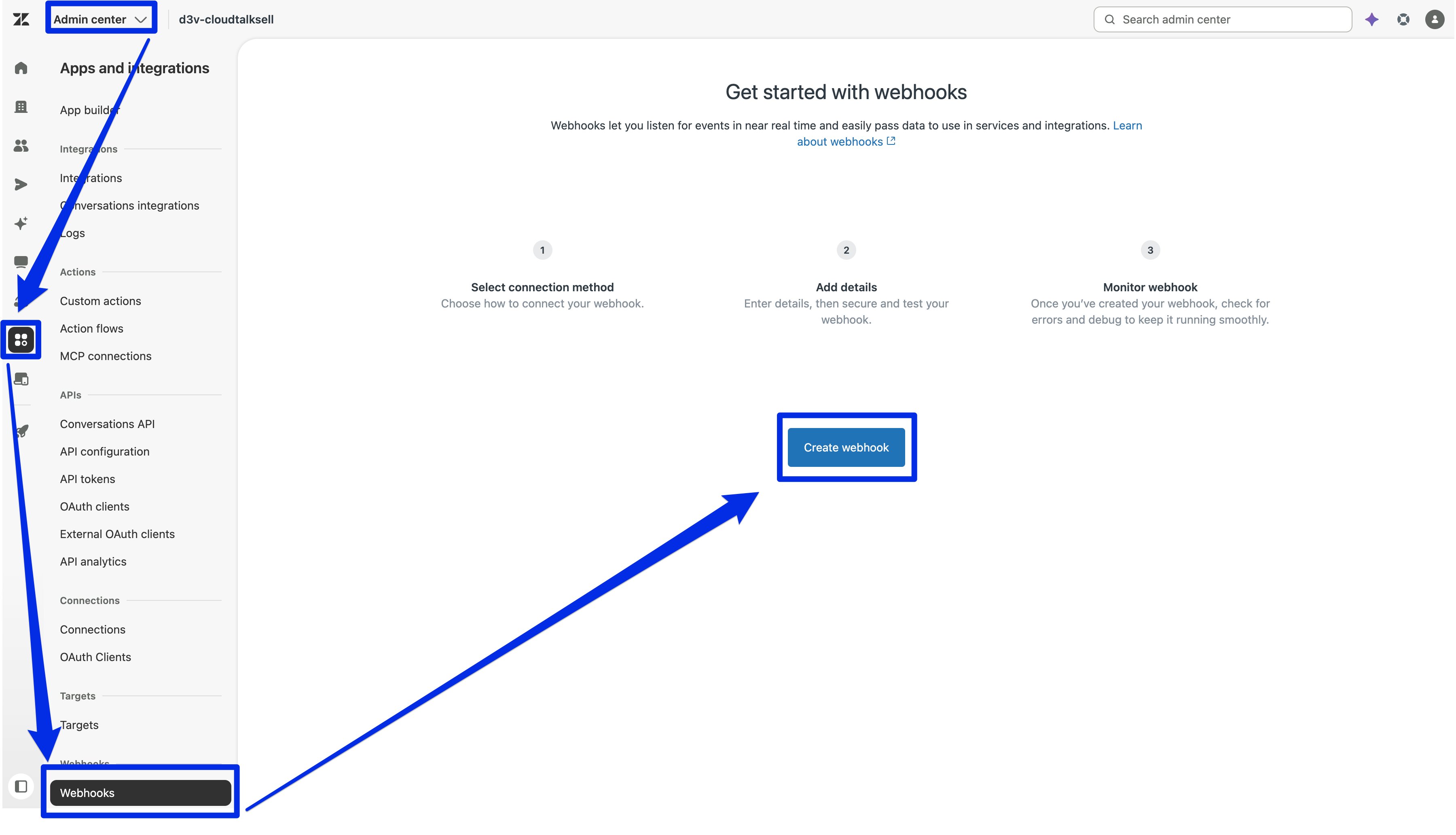
1. Ga in het Zendesk Admin Center naar **Apps and integrations > Webhooks**.
2. Klik op **Create webhook**.
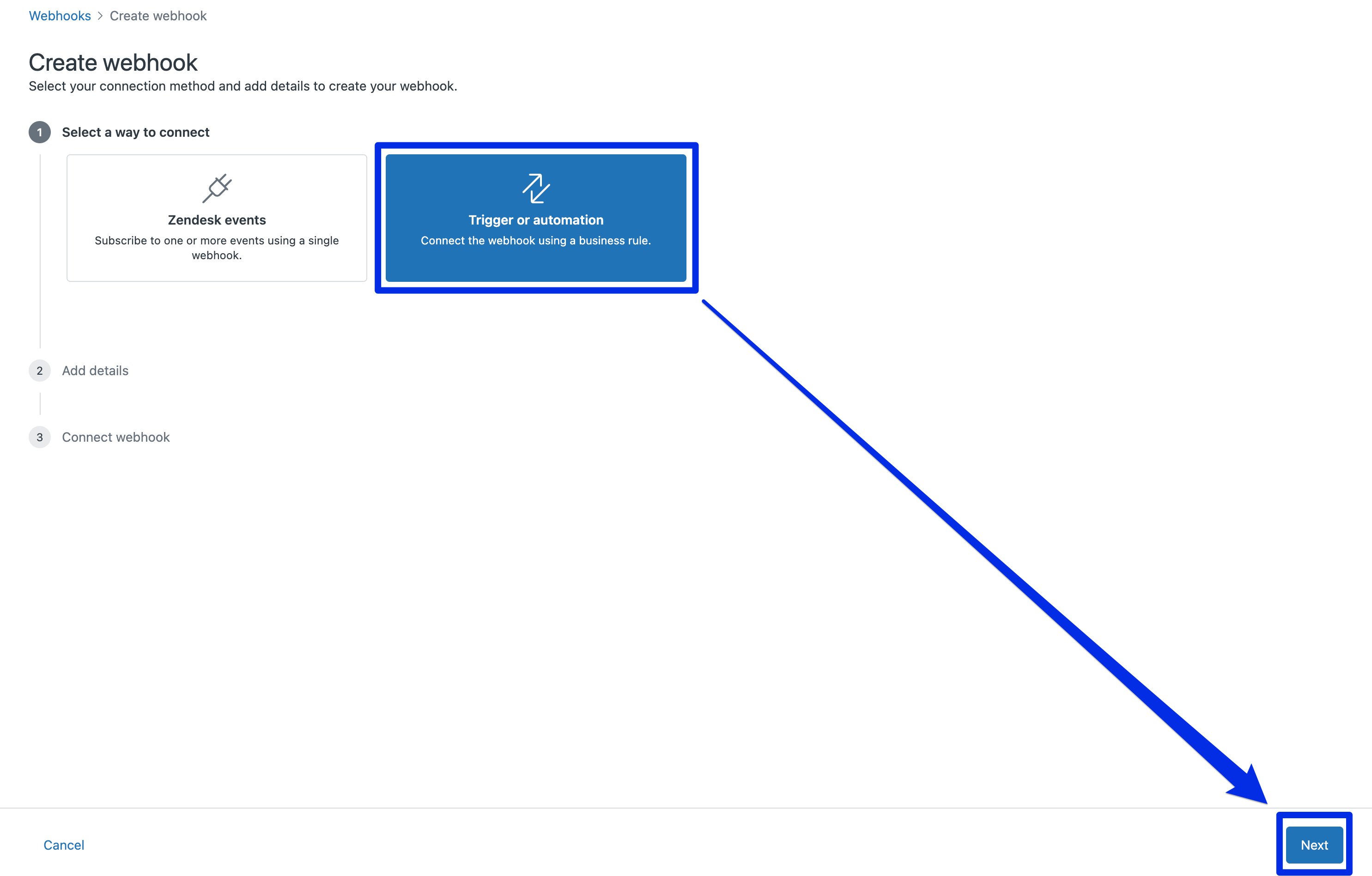
 3. Selecteer **Trigger or automation** en klik op **Next**.
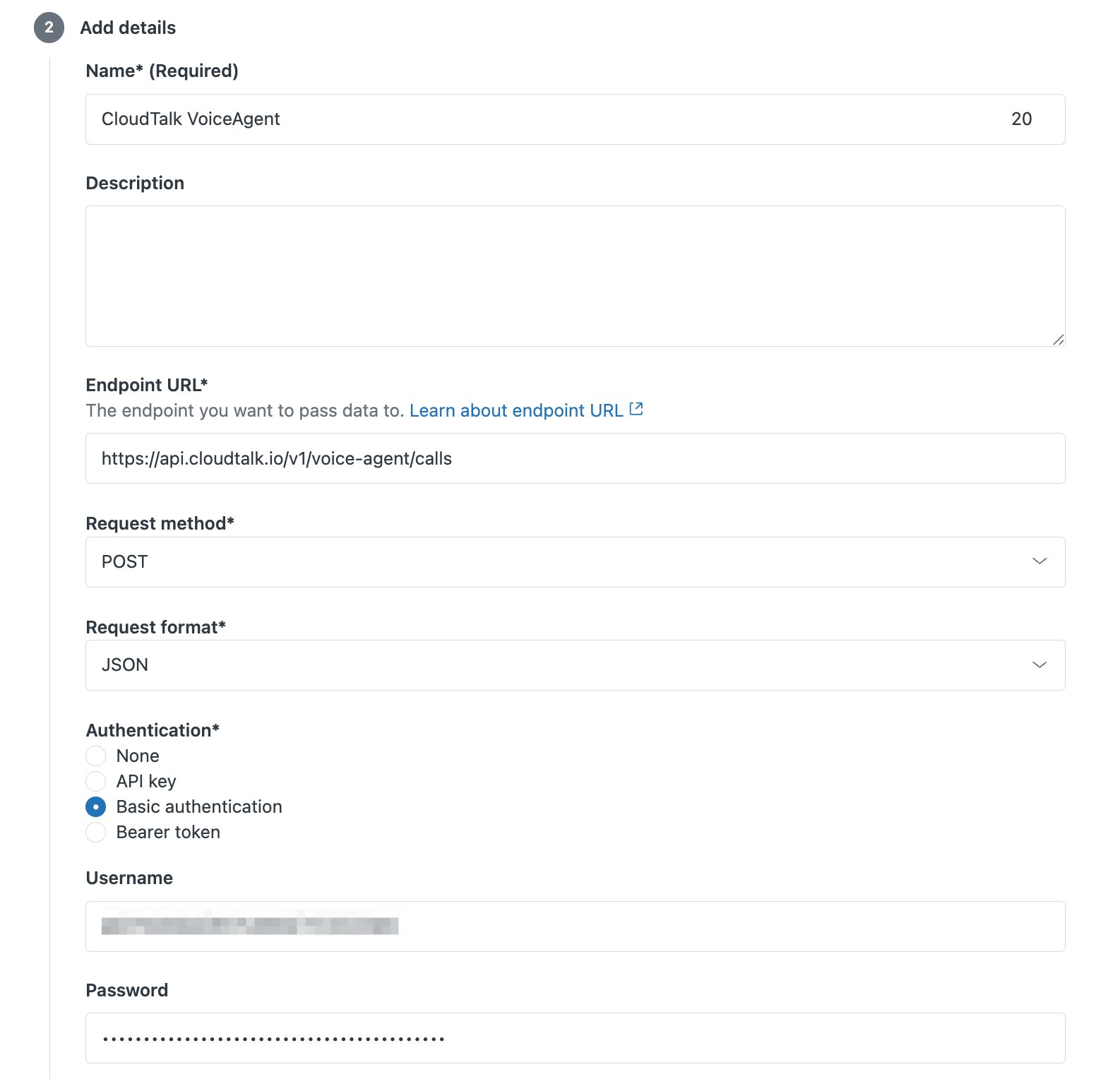
 4. Configureer de webhook:
* **Name:** CloudTalk VoiceAgent
* **Endpoint URL:** `https://api.cloudtalk.io/v1/voice-agent/calls`
* **Request method:** POST
* **Request format:** JSON
* **Authentication:** Basic authentication
* **Username:** uw CloudTalk API-sleutel
* **Password:** uw CloudTalk API Secret
4. Configureer de webhook:
* **Name:** CloudTalk VoiceAgent
* **Endpoint URL:** `https://api.cloudtalk.io/v1/voice-agent/calls`
* **Request method:** POST
* **Request format:** JSON
* **Authentication:** Basic authentication
* **Username:** uw CloudTalk API-sleutel
* **Password:** uw CloudTalk API Secret
 5. Klik op **Create webhook > Finish Setup**.
Zendesk codeert de inloggegevens automatisch in Base64 wanneer Basic authentication is geselecteerd.
5. Klik op **Create webhook > Finish Setup**.
Zendesk codeert de inloggegevens automatisch in Base64 wanneer Basic authentication is geselecteerd.
De trigger aanmaken
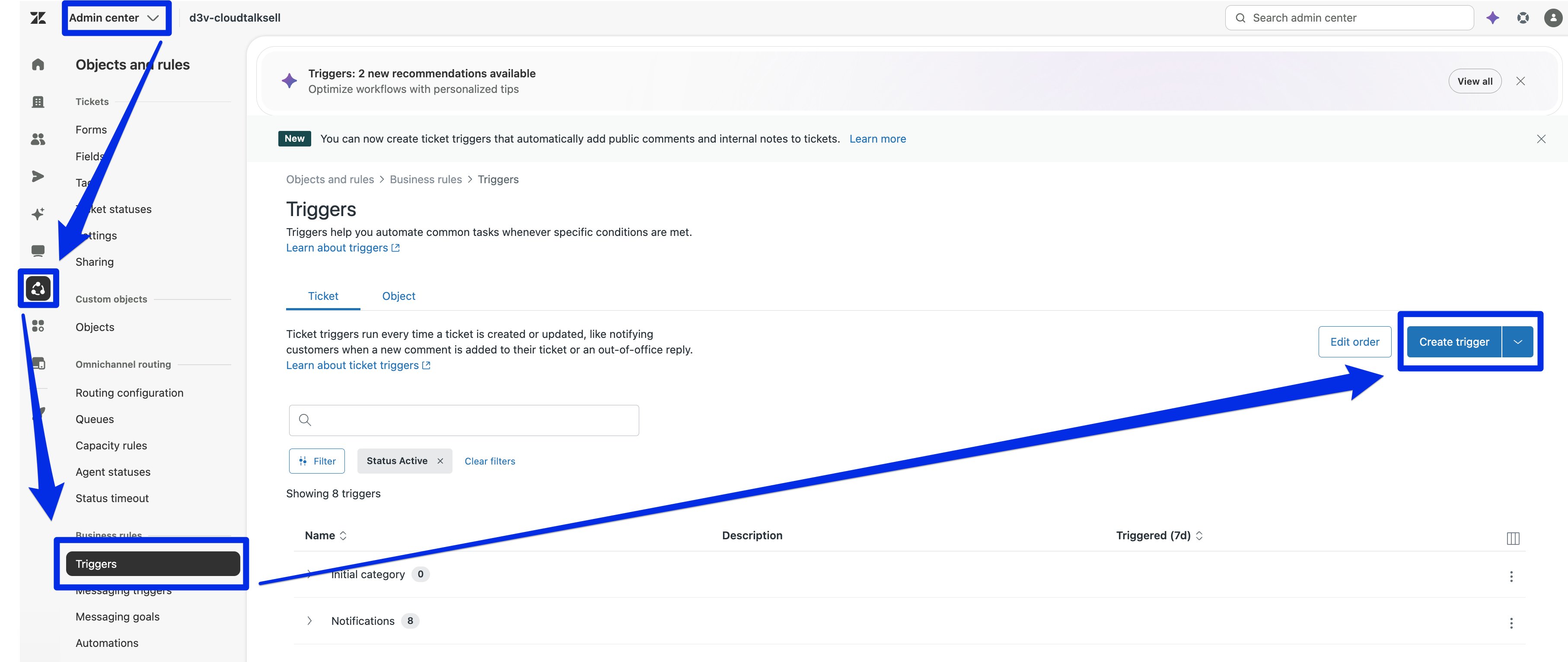
1. Ga in het Admin Center naar **Objects and rules > Business rules > Triggers** (of **Automations**).
2. Klik op **Create trigger**.
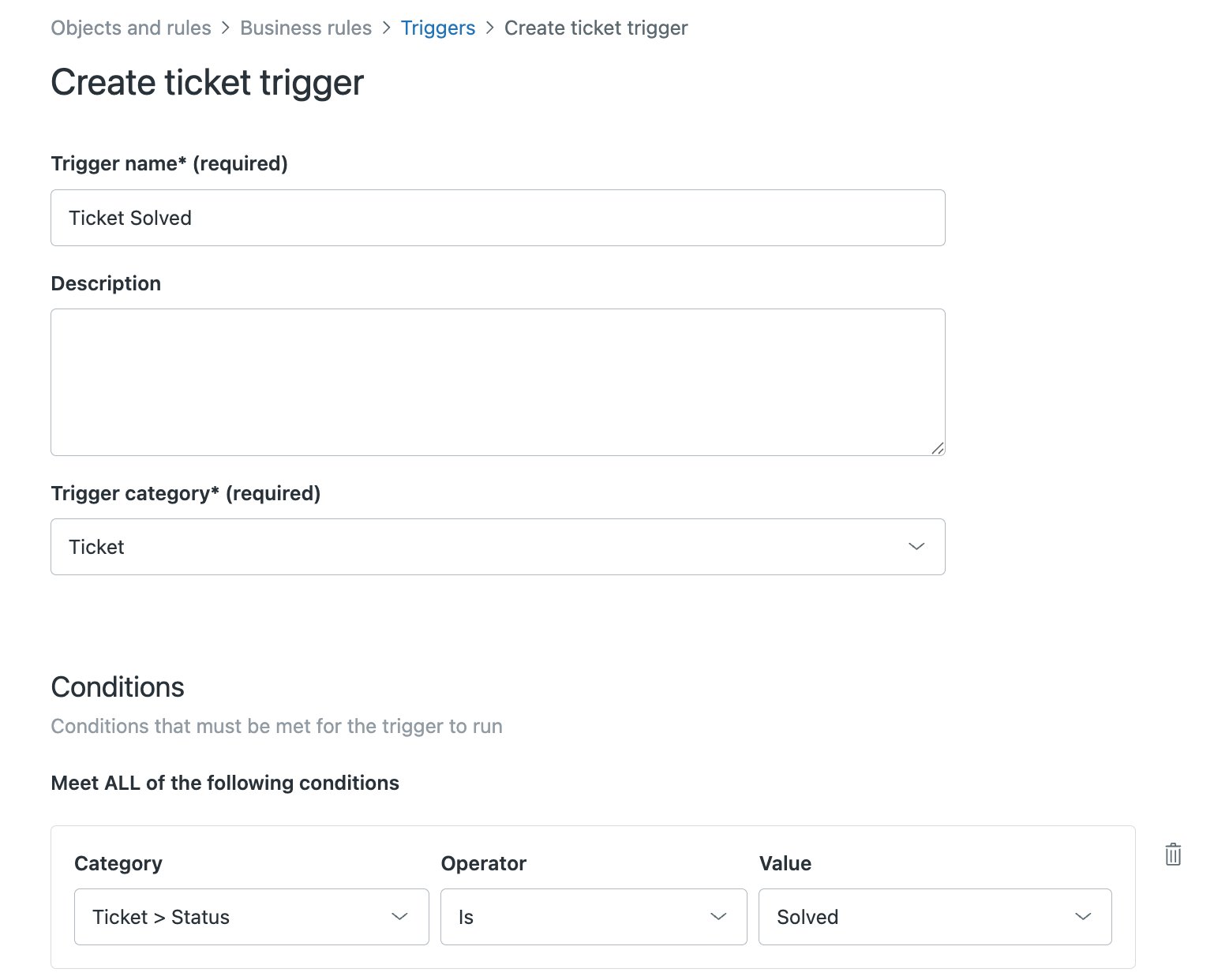
 3. Voer een **Trigger name** in (bijv. Ticket Solved).
4. Kies een **Trigger category**: maak een nieuwe categorie aan of kies een bestaande die past.
5. Stel uw **Conditions** in (bijv. Ticket > Status > Is > Solved).
3. Voer een **Trigger name** in (bijv. Ticket Solved).
4. Kies een **Trigger category**: maak een nieuwe categorie aan of kies een bestaande die past.
5. Stel uw **Conditions** in (bijv. Ticket > Status > Is > Solved).
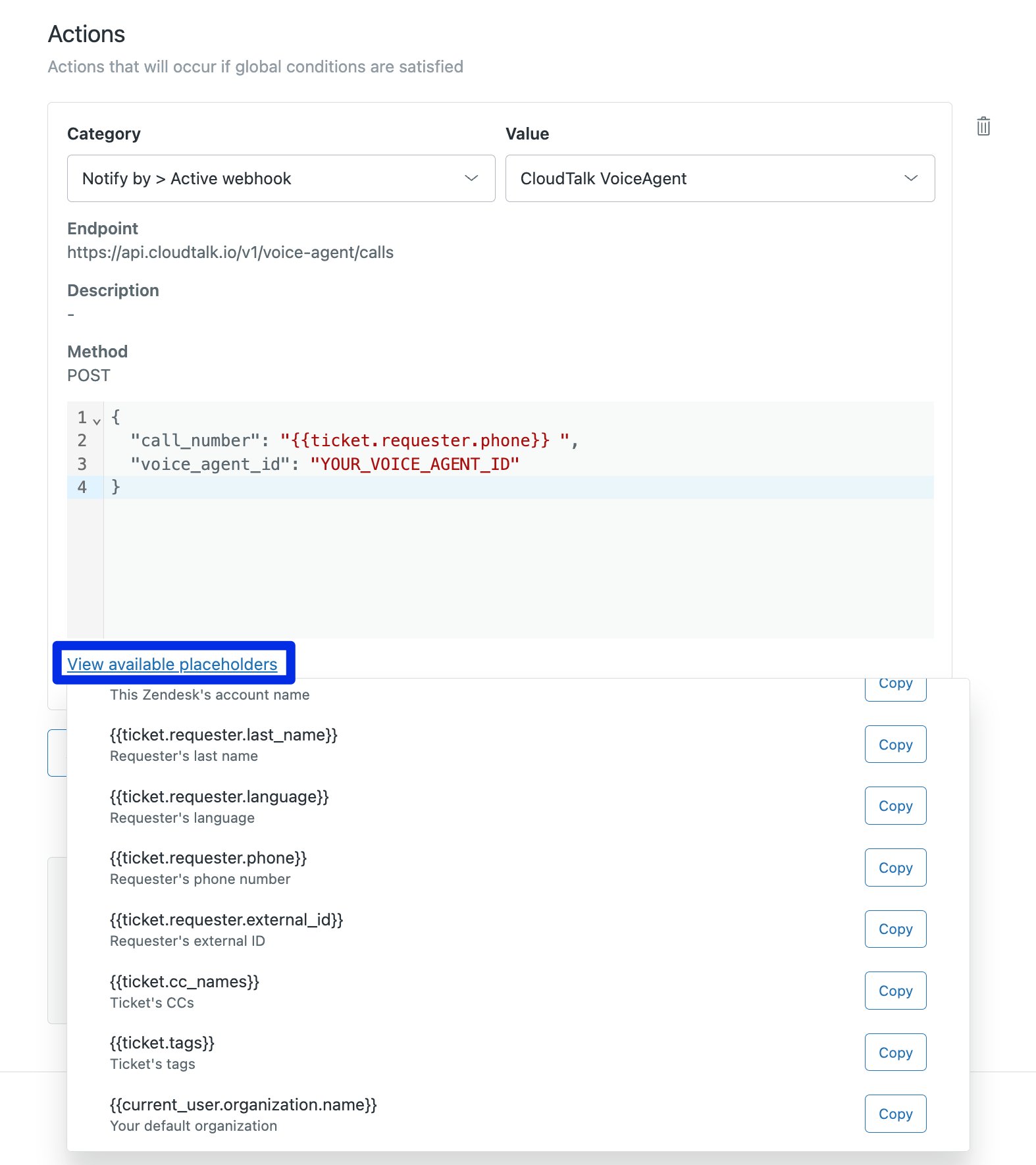
 6. Klik onder **Actions** op **Add action** en selecteer **Notify active webhook**.
7. Selecteer de webhook die u in stap 1 hebt aangemaakt. Er verschijnt een tekstvak voor de JSON-body.
8. Voer uw JSON-payload in het tekstvak in. Gebruik de Zendesk-placeholder `#{{ticket.requester.phone}}` om het telefoonnummer van de aanvrager toe te wijzen aan `call_number`:
6. Klik onder **Actions** op **Add action** en selecteer **Notify active webhook**.
7. Selecteer de webhook die u in stap 1 hebt aangemaakt. Er verschijnt een tekstvak voor de JSON-body.
8. Voer uw JSON-payload in het tekstvak in. Gebruik de Zendesk-placeholder `#{{ticket.requester.phone}}` om het telefoonnummer van de aanvrager toe te wijzen aan `call_number`:
 ```json theme={"system"}
{
"call_number": "#{{ticket.requester.phone}}",
"voice_agent_id": "YOUR_VOICE_AGENT_ID"
}
```
`call_number` en `voice_agent_id` zijn de enige verplichte velden. Aanvullende `call_properties`, zoals systeemprompt-variabelen en outputvariabelen, zijn optioneel en hangen af van uw VoiceAgent-configuratie. [Lees wat u kunt opnemen](/nl/articles/11401649-voiceagents-for-outbound-calls).
9\. Zet de trigger rechtsonder op **Active** en klik op **Create**.
```json theme={"system"}
{
"call_number": "#{{ticket.requester.phone}}",
"voice_agent_id": "YOUR_VOICE_AGENT_ID"
}
```
`call_number` en `voice_agent_id` zijn de enige verplichte velden. Aanvullende `call_properties`, zoals systeemprompt-variabelen en outputvariabelen, zijn optioneel en hangen af van uw VoiceAgent-configuratie. [Lees wat u kunt opnemen](/nl/articles/11401649-voiceagents-for-outbound-calls).
9\. Zet de trigger rechtsonder op **Active** en klik op **Create**.
Testen en controleren
1. Werk een testticket bij zodat het aan de triggervoorwaarden voldoet.
2. Ga naar **Apps and integrations > Webhooks > CloudTalk VoiceAgent > Activity** om de aflevering te bevestigen.
3. Controleer in CloudTalk of de VoiceAgent-oproep is gestart.
**Klaar!**
Zendesk start nu automatisch een CloudTalk VoiceAgent-oproep zodra een ticket aan de door u gekozen voorwaarden voldoet.
Problemen oplossen
Is de oproep niet gestart, ga dan naar **Apps and integrations > Webhooks > CloudTalk VoiceAgent > Activity** om te zien waarom de aflevering is mislukt.
De meest voorkomende oorzaken zijn:
* **Autorisatie**: onjuiste CloudTalk API-inloggegevens in de webhook
* **Telefoonnotatie**: het nummer staat niet in E.164-notatie (`+1234567890`)
* **Onjuist VoiceAgent-ID**: er is een verkeerd `voice_agent_id` verzonden
* **Webhook niet geactiveerd**: de trigger is niet actief of er is niet aan de voorwaarden voldaan
***
*Hulp nodig of hebt u een vraag?* Neem gerust contact op via ons [supportportaal](https://support.cloudtalk.io/hc/en-us/requests/new?ticket_form_id=26305535257884) — we staan voor u klaar.
## Related topics
- [Een VoiceAgent-oproep starten vanuit Pipedrive](/nl/articles/15516233-triggering-a-voiceagent-call-from-pipedrive.md)
- [Een VoiceAgent-oproep starten vanuit Salesforce](/nl/articles/16064425-triggering-a-voiceagent-call-from-salesforce.md)
- [Een VoiceAgent-oproep starten vanuit Zapier](/nl/articles/11831224-triggering-a-voiceagent-call-from-zapier.md)
This documentation is built and hosted on [Mintlify](https://mintlify.com), a developer documentation platform.