> ## Documentation Index
> Fetch the complete documentation index at: https://help.cloudtalk.io/llms.txt
> Use this file to discover all available pages before exploring further.
# Een VoiceAgent-oproep activeren vanuit Freshworks CRM
> Automatiseer uitgaande VoiceAgent-oproepen rechtstreeks vanuit Freshworks CRM
In deze handleiding leert u hoe u automatisch een CloudTalk VoiceAgent-oproep activeert vanuit Freshworks CRM (Freshsales) met Workflowautomatiseringen.
**Gebruikersniveau**: Admin
***
Voordat u begint
U heeft het volgende nodig:
* Een CloudTalk VoiceAgent die al is aangemaakt (noteer de VoiceAgent-ID)
* CloudTalk API-gegevens (API-sleutel en Secret) die u vindt in **Bedrijfsinstellingen > Integraties > API** ([Hoe u uw CloudTalk API-sleutels opent en genereert](/nl/articles/15272380-how-to-access-and-generate-your-cloudtalk-api-keys))
* Een Freshworks CRM **Growth plan** of hoger
* Een telefoonnummer dat beschikbaar is op Contact-records
De Authorization-header genereren
CloudTalk gebruikt Basic Authentication voor API-verzoeken.
1. Open [https://www.debugbear.com/basic-auth-header-generator](https://www.debugbear.com/basic-auth-header-generator)
2. Voer uw **CloudTalk API-sleutel** in als Username en uw **API Secret** als Password
3. Kopieer de gegenereerde waarde. Deze ziet er zo uit: `Basic XXXXXXXXX`
**Let op:** Freshworks CRM accepteert ook een gewone combinatie van gebruikersnaam en wachtwoord rechtstreeks in de webhookconfiguratie, waardoor de Base64-gecodeerde header optioneel is. Beide methoden werken.
De integratie instellen
De workflowautomatisering aanmaken
1\. Ga in Freshworks CRM naar **Admin Settings > Teams & Territories > Workflows**
2\. Klik op **Create your own workflow**
3\. Kies de module: **Contacts** (of Accounts / Deals)
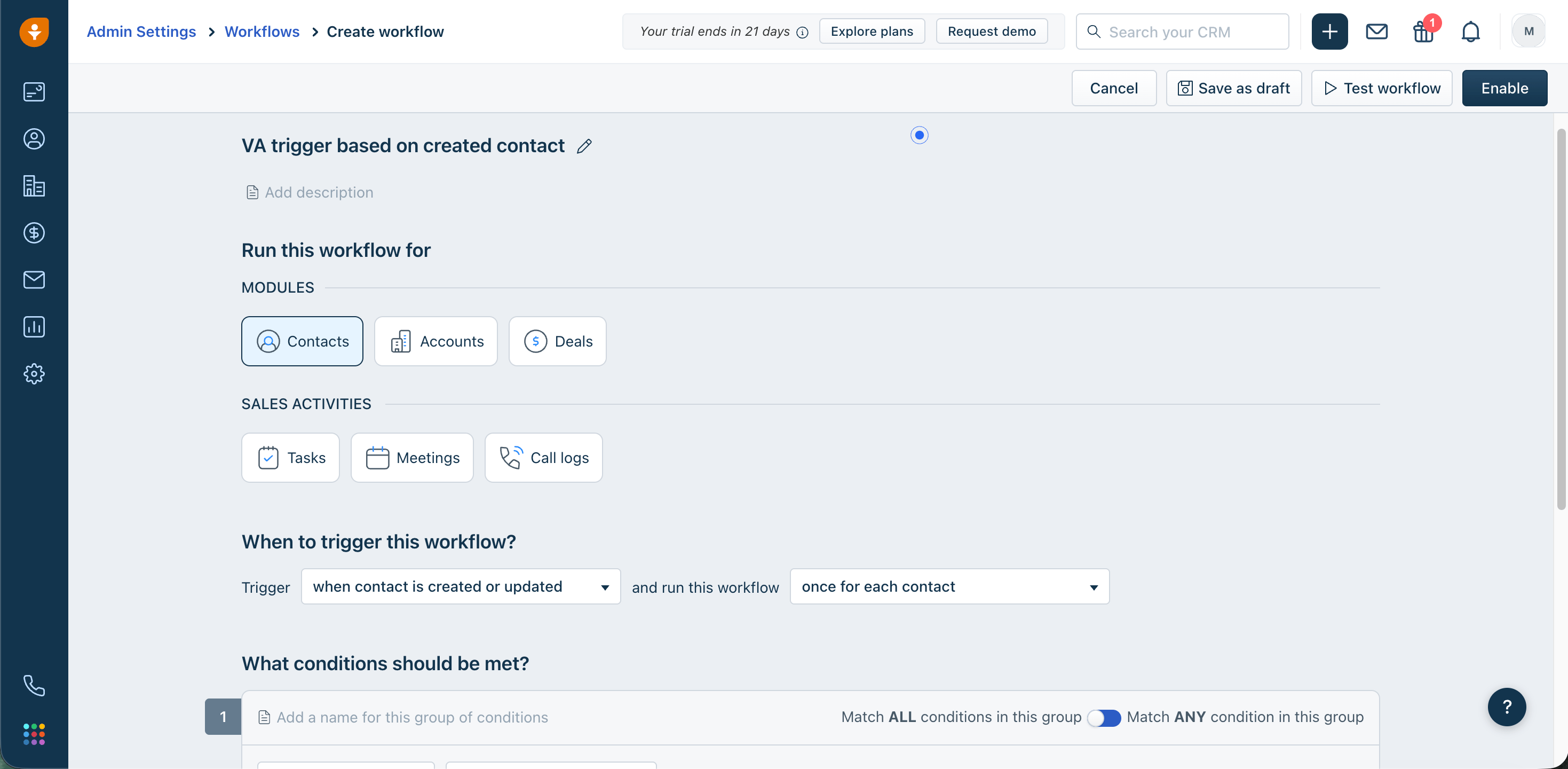 4\. Stel de **triggergebeurtenis** in, bijvoorbeeld:
* *Contact is created*
* *Field is updated* (bijv. status verandert in "Interested")
5\. Voeg **condities** toe om te filteren welke records de oproep activeren (bijv. mobiel nummer is aanwezig)
4\. Stel de **triggergebeurtenis** in, bijvoorbeeld:
* *Contact is created*
* *Field is updated* (bijv. status verandert in "Interested")
5\. Voeg **condities** toe om te filteren welke records de oproep activeren (bijv. mobiel nummer is aanwezig)
De webhook-actie toevoegen
1\. Klik onder **Actions** op **Add Action > Webhook**
2\. Configureer de webhook:
| Veld | Waarde |
| - | - |
| Request type | POST |
| URL | `https://api.cloudtalk.io/v1/voice-agent/calls` |
| Authentication | Username / Password (Client ID / Client Secret) |
| Encoding | JSON |
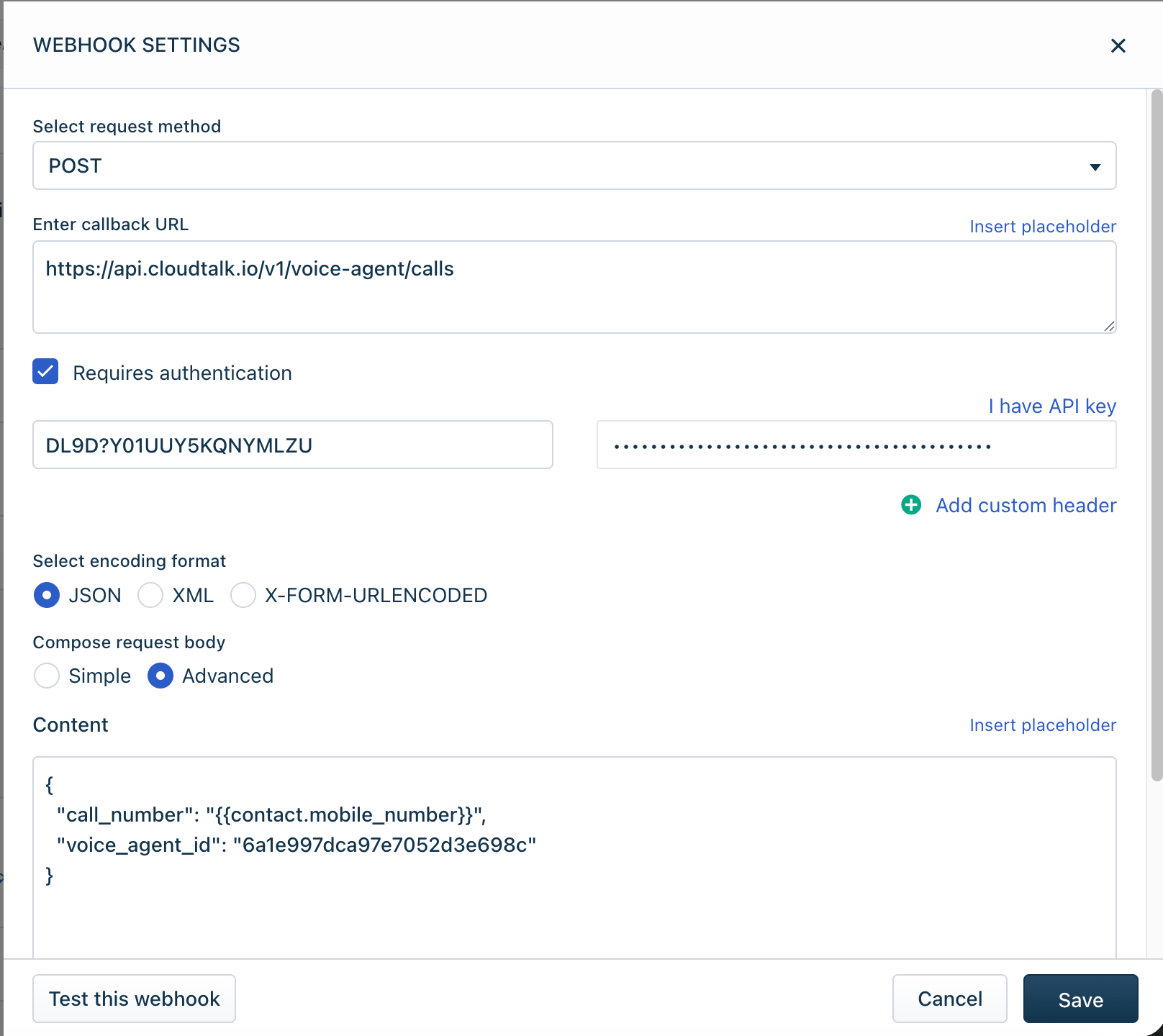 3\. Plak onder **Request body (Advanced)** het volgende:
```json theme={"system"}
{ "call_number": "#{{contact.mobile_number}}", "voice_agent_id": "YOUR_VOICE_AGENT_ID" }
```
`call_number` en `voice_agent_id` zijn de enige verplichte velden. U kunt ook optionele `call_properties` meesturen, zoals variabelen voor de systeemprompt en outputvariabelen, afhankelijk van uw VoiceAgent-configuratie. [Ontdek wat u kunt opnemen](/nl/articles/11401649-voiceagents-for-outbound-calls)
4\. Klik op **Save** en zet de workflow daarna op **Enable**.
3\. Plak onder **Request body (Advanced)** het volgende:
```json theme={"system"}
{ "call_number": "#{{contact.mobile_number}}", "voice_agent_id": "YOUR_VOICE_AGENT_ID" }
```
`call_number` en `voice_agent_id` zijn de enige verplichte velden. U kunt ook optionele `call_properties` meesturen, zoals variabelen voor de systeemprompt en outputvariabelen, afhankelijk van uw VoiceAgent-configuratie. [Ontdek wat u kunt opnemen](/nl/articles/11401649-voiceagents-for-outbound-calls)
4\. Klik op **Save** en zet de workflow daarna op **Enable**.
Testen en controleren
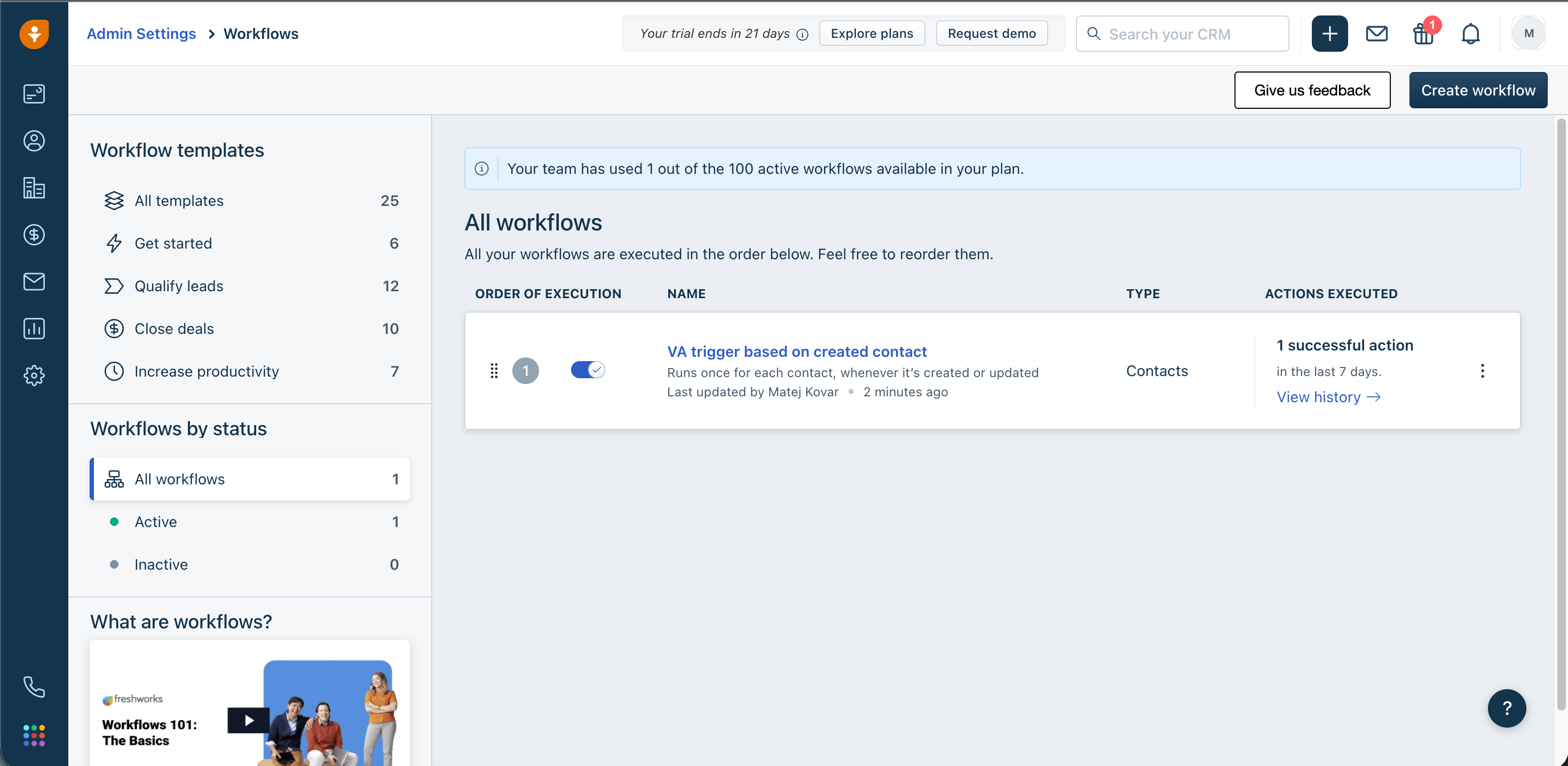
1. Maak of update een Contact dat aan uw triggervoorwaarden voldoet
2. Ga naar **Admin Settings > Automations > Workflow logs** en controleer de uitvoeringsstatus
3. Controleer in CloudTalk of de VoiceAgent-oproep is gestart
**Klaar!** 🚀 Uw Freshworks CRM-workflow activeert nu een CloudTalk VoiceAgent-oproep zodra een contact aan de door u gekozen voorwaarden voldoet.
💡 **API-limieten om rekening mee te houden**
*Om fouten of throttling te voorkomen, zorgt u ervoor dat uw Freshworks CRM-workflow de verdeling van oproepen zorgvuldig afhandelt. Gebruik waar nodig vertragingen of planningslogica, want de standaard API-rate limit (60 verzoeken per minuut) geldt ook voor het VoiceAgent-endpoint.*
Probleemoplossing
| Fout | Wat u moet controleren |
| - | - |
| **401 Unauthorized** | Genereer de Authorization-header of de inloggegevens opnieuw en voer ze opnieuw in |
| **400 Bad Request** | Controleer of het telefoonnummer in E.164-formaat staat (`+1234567890`) en of `voice_agent_id` juist is |
| **Workflow wordt niet uitgevoerd** | Controleer of aan alle condities is voldaan, of de triggergebeurtenis van toepassing is en of de workflow is ingeschakeld |
***
Hulp nodig of een vraag? Neem contact met ons op via ons [Supportportaal](https://support.cloudtalk.io/hc/en-us/requests/new?ticket_form_id=26305535257884). We zijn er voor
## Related topics
- [Een VoiceAgent-oproep activeren vanuit Freshdesk](/nl/articles/15457387-triggering-a-voiceagent-call-from-freshdesk.md)
- [Een VoiceAgent-oproep activeren vanuit Freshservice](/nl/articles/15502021-triggering-a-voiceagent-call-from-freshservice.md)
- [Een VoiceAgent-oproep activeren vanuit Kustomer](/nl/articles/16063131-triggering-a-voiceagent-call-from-kustomer.md)
This documentation is built and hosted on [Mintlify](https://mintlify.com), a developer documentation platform.