> ## Documentation Index
> Fetch the complete documentation index at: https://help.cloudtalk.io/llms.txt
> Use this file to discover all available pages before exploring further.

# CloudTalk gebruiken met Microsoft Dynamics 365 Sales

> Ontdek hoe oproepen worden afgehandeld en hoe informatie wordt gesynchroniseerd tussen CloudTalk en Microsoft Dynamics 365 Sales.

<Note>
  In dit artikel leest u hoe CloudTalk samenwerkt met Microsoft Dynamics 365 Sales, inclusief bellen, gegevenssynchronisatie en het vastleggen van activiteiten.
</Note>

**Gebruikersniveau**: Admin, Agent, Supervisor

***

<h2 id="h_3d9d97c876">
  Bellen vanuit Microsoft Dynamics 365 Sales
</h2>

<h3 id="h_ff049637a9">
  Uitgaande oproepen starten
</h3>


Als [Click-to-Call](/nl/articles/2964244-the-click-to-call-extension) is ingeschakeld, worden telefoonnummers in Microsoft Dynamics 365 Sales klikbaar, zodat u met één klik een gesprek kunt starten.

U kunt uitgaande oproepen rechtstreeks starten vanuit:

* Contactrecords

* Leadrecords

* Accountrecords

Als u op een telefoonnummer klikt, wordt CloudTalk Phone geopend en wordt het geselecteerde nummer automatisch ingevuld.

Zodra het gesprek start, ziet u de klantgegevens voor de volledige context.

<Frame>
  <img src="https://mintcdn.com/cloudtalk/uyJpY-sHvW90NlHP/images/help-center/articles/14322905/a8c29378451d-mds.webp?fit=max&auto=format&n=uyJpY-sHvW90NlHP&q=85&s=e929ef8e1cc4ce7957d9d3b4119fdbd6" alt="" width="2191" height="1075" data-path="images/help-center/articles/14322905/a8c29378451d-mds.webp" />
</Frame>

<h3 id="h_f1d87cf3dd">
  Inkomende oproepen ontvangen
</h3>

Bij een inkomende oproep identificeert CloudTalk de beller op basis van het telefoonnummer.

Als het contact in Microsoft Dynamics 365 Sales bestaat, wordt de oproep vastgelegd en gekoppeld aan het bijbehorende contact of de bijbehorende lead.

U kunt het gerelateerde record rechtstreeks vanuit de CloudTalk-app openen via de integratielink.

<h2 id="h_52f5f802c7">
  Gesprekslogging & gegevensuitwisseling
</h2>

<h3 id="h_a5cc55faf4">
  Contactsynchronisatie
</h3>

CloudTalk synchroniseert **Contacts, Leads en Accounts (Companies)** vanuit Microsoft Dynamics 365.

Contacten worden automatisch geïmporteerd in CloudTalk en [samengevoegd](/nl/articles/5639498-contact-merging) als ze hetzelfde telefoonnummer, hetzelfde e-mailadres of dezelfde naam delen.

<table>
  <tbody>
    <tr>
      <td>
        **CloudTalk-contact**
      </td>

      <td>
        **MS Dynamics-contact**
      </td>

      <td>
        **MS Dynamics Account (bedrijf)**
      </td>
    </tr>

    <tr>
      <td>
        Naam
      </td>

      <td>
        First name\
        Last name
      </td>

      <td />
    </tr>

    <tr>
      <td>
        Contactlink
      </td>

      <td>
        Koppeling naar het contactprofiel
      </td>

      <td />
    </tr>

    <tr>
      <td>
        Telefoons
      </td>

      <td>
        Importeert:

        * Business phone

        * Mobile phone
      </td>

      <td />
    </tr>

    <tr>
      <td>
        E-mails
      </td>

      <td>
        Email
      </td>

      <td />
    </tr>

    <tr>
      <td>
        Tags
      </td>

      <td>
        `microsoft_dynamics`
      </td>

      <td />
    </tr>

    <tr>
      <td>
        Bedrijf
      </td>

      <td />

      <td>
        Account Name
      </td>
    </tr>

    <tr>
      <td>
        Adres
      </td>

      <td>
        Address 1: Street 1
      </td>

      <td />
    </tr>

    <tr>
      <td>
        Stad
      </td>

      <td>
        Address 1: City
      </td>

      <td />
    </tr>

    <tr>
      <td>
        Postcode
      </td>

      <td>
        Address 1: Zip/Postal code
      </td>

      <td />
    </tr>

    <tr>
      <td>
        Provincie
      </td>

      <td>
        Address 1: State/Province
      </td>

      <td />
    </tr>

    <tr>
      <td>
        Land
      </td>

      <td>
        🚫
      </td>

      <td />
    </tr>

    <tr>
      <td>
        Favoriete agent
      </td>

      <td>
        Owner

        *alleen als het e-mailadres van de Owner ook het e-mailadres van een CloudTalk-agent is*
      </td>

      <td />
    </tr>
  </tbody>
</table>

<h3 id="h_ee55bc2b3c">
  Contacten aanmaken en bijwerken (tweerichtingssynchronisatie)
</h3>

Contacten worden tussen CloudTalk en Microsoft Dynamics 365 gesynchroniseerd via een **tweerichtingssynchronisatie**.

Wanneer een contact in het ene systeem wordt aangemaakt of bijgewerkt, wordt het automatisch ook in het andere systeem aangemaakt of bijgewerkt.

CloudTalk probeert contacten eerst te matchen op:

1. Telefoonnummer

2. E-mailadres

Als er geen match wordt gevonden, wordt er een nieuw contact aangemaakt.

<table>
  <tbody>
    <tr>
      <td>
        **CloudTalk-contact**
      </td>

      <td>
        **Dynamics-contact**
      </td>
    </tr>

    <tr>
      <td>
        Naam
      </td>

      <td>
        First name

        *Tekens vóór de eerste spatie in de naam van het CloudTalk-contact*

        Last name

        *Tekens na de eerste spatie*
      </td>
    </tr>

    <tr>
      <td>
        Contactlink
      </td>

      <td>
        Koppeling naar het contactprofiel
      </td>
    </tr>

    <tr>
      <td>
        Telefoonnummers

        *alleen het eerste en het tweede*
      </td>

      <td>
        Business phone

        Mobile phone
      </td>
    </tr>

    <tr>
      <td>
        E-mail

        *alleen het eerste*
      </td>

      <td>
        Email
      </td>
    </tr>

    <tr>
      <td>
        Adres
      </td>

      <td>
        Address 1: Street 1
      </td>
    </tr>

    <tr>
      <td>
        Stad
      </td>

      <td>
        Address 1: City
      </td>
    </tr>

    <tr>
      <td>
        Postcode
      </td>

      <td>
        Address 1: Zip
      </td>
    </tr>

    <tr>
      <td>
        Provincie
      </td>

      <td>
        Address 1: State
      </td>
    </tr>

    <tr>
      <td>
        Land
      </td>

      <td>
        🚫
      </td>
    </tr>

    <tr>
      <td>
        Favoriete agent
      </td>

      <td>
        Contact Owner

        *alleen als het e-mailadres van de owner ook het e-mailadres van een CloudTalk-agent is*
      </td>
    </tr>
  </tbody>
</table>

<h3 id="h_a550b9ac9f">
  Gesprekslogging & export
</h3>

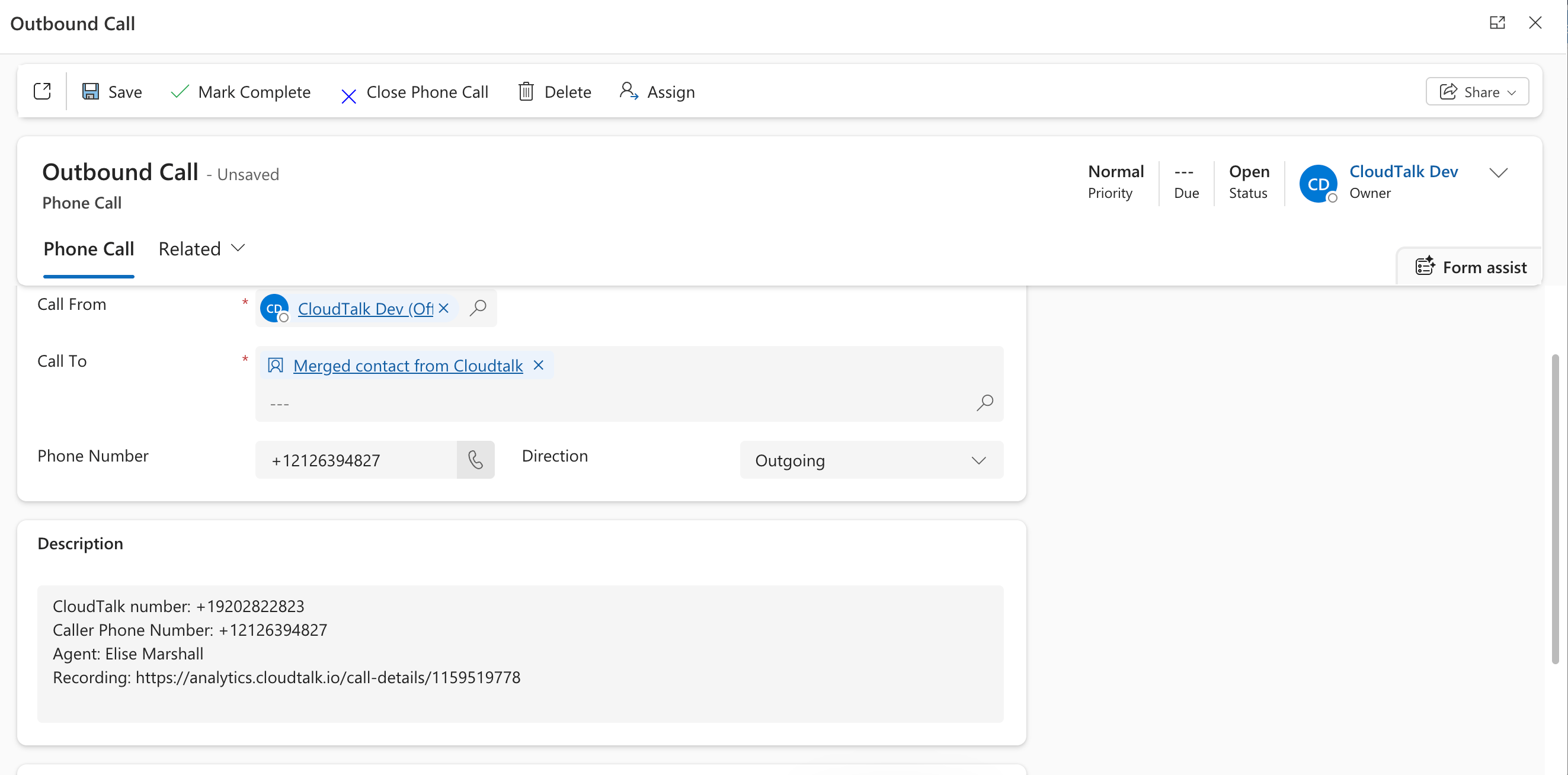
CloudTalk legt oproepen vast als **Phone Call-taken** in Microsoft Dynamics 365, gekoppeld aan het bijbehorende contact of de bijbehorende lead.

U kunt bepalen welke oproepen worden geëxporteerd door specifieke nummers te selecteren in de instellingen *[Gekoppelde nummers](/nl/articles/7052011-configure-microsoft-dynamics-365-sales#:~:text=Connected%20numbers%20limits)*.

| **CloudTalk-oproep** | **MS Dynamics Phone Call-taak** |
| - | - |
| Contact | Dynamics-contact |
| Gesprekslink | Koppeling naar de Phone Call-taak |
| Agent of contact | Gesprek van: `Uitgaand` > Dynamics-gebruiker `Inkomend` > Dynamics-contact |
| Agent of contact | Gesprek naar: `Uitgaand` > Dynamics-contact `Inkomend` > Dynamics-gebruiker |
| Richting | Direction |
| Telefoonnummer van het contact | Phone number |
| Gespreksnotities Opname-URL | Description |
| Gesprekstags | Description |
| Spreektijd | Duration |
| Agent | Owner |

<Frame>
  <img src="https://mintcdn.com/cloudtalk/uyJpY-sHvW90NlHP/images/help-center/articles/14322905/40143cb00790-screenshot-2026-03-31-at-15-05-28.png?fit=max&auto=format&n=uyJpY-sHvW90NlHP&q=85&s=72893e14388c10ae08206d43768df156" alt="" width="2646" height="1308" data-path="images/help-center/articles/14322905/40143cb00790-screenshot-2026-03-31-at-15-05-28.png" />
</Frame>

<h3 id="h_d2f2e469c5">
  SMS-logging
</h3>

SMS-berichten worden vastgelegd als **SMS-taken** in Microsoft Dynamics 365.

U kunt beperken welke SMS-berichten worden geëxporteerd door specifieke CloudTalk-nummers toe te wijzen in het gedeelte *[Gekoppelde nummers](/nl/articles/7052011-configure-microsoft-dynamics-365-sales#:~:text=Connected%20numbers%20limits) voor SMS*.

<table>
  <tbody>
    <tr>
      <td>
        **CloudTalk-SMS**
      </td>

      <td>
        **MS Dynamics SMS-taak**
      </td>
    </tr>

    <tr>
      <td>
        richting
      </td>

      <td>
        Subject
      </td>
    </tr>

    <tr>
      <td>
        Opmaak als: \{direction} SMS
      </td>

      <td />
    </tr>

    <tr>
      <td>
        Tekst
      </td>

      <td>
        Description
      </td>
    </tr>

    <tr>
      <td>
        Contact
      </td>

      <td>
        Description
      </td>
    </tr>

    <tr>
      <td>
        Agent

        *alleen voor uitgaande SMS-berichten*
      </td>

      <td>
        Owner
      </td>
    </tr>
  </tbody>
</table>

<h3 id="h_fb3834739b">
  Deals-synchronisatie
</h3>

Tijdens de eerste synchronisatie importeert CloudTalk **Opportunities (Deals)** en toont ze als activiteiten bij het contact.

| **CloudTalk-contactactiviteit** | **Dynamics Opportunity** |
| - | - |
| Deal | Opportunity |
| Activiteitslink | Koppeling naar de Opportunity |
| Titel | Name |
| Bedrag | Budget Amount |
| Valuta van het bedrag | Currency |
| `Open`/`Gesloten` | Status |

<Tip>
  **Oproepen van niet-gekoppelde nummers**

  Wanneer CloudTalk een oproep vastlegt van een telefoonnummer dat niet overeenkomt met een bestaand contact in Microsoft Dynamics 365, wordt er automatisch een nieuwe lead aangemaakt met de naam "Unknown lead from CloudTalk". U kunt het record daarna bijwerken met de juiste gegevens.
</Tip>

***

*Hulp nodig of hebt u een vraag?* Neem gerust contact op via ons [Supportportaal](https://support.cloudtalk.io/hc/en-us/requests/new?ticket_form_id=26305535257884) — we staan voor u klaar.


## Related topics

- [Microsoft Dynamics 365 Sales configureren](/nl/articles/7052011-configure-microsoft-dynamics-365-sales.md)
- [Integratiegids](/nl/articles/10570091-integrations-guide.md)
- [CloudTalk gebruiken met MS Teams](/nl/articles/9691181-using-cloudtalk-with-ms-teams.md)


This documentation is built and hosted on [Mintlify](https://mintlify.com), a developer documentation platform.