> ## Documentation Index
> Fetch the complete documentation index at: https://help.cloudtalk.io/llms.txt
> Use this file to discover all available pages before exploring further.
# Shopify configureren
> Configureer de gegevensuitwisseling tussen CloudTalk en Shopify, zodat uw gegevens up-to-date blijven.
Dit artikel legt uit hoe u de verbinding tussen CloudTalk en Shopify instelt.
**Gebruikersniveau**: Admin
***
Zoekt u instructies voor het gebruik van CloudTalk binnen Shopify?\
Bekijk onze handleiding [CloudTalk gebruiken met Shopify](/nl/articles/11727412-using-shopify-with-cloudtalk)**.**
⚠️ Het is momenteel niet mogelijk om een nieuwe Shopify-integratie in te stellen. Bestaande verbindingen worden hierdoor niet beïnvloed. Neem voor updates contact op met [Support](https://support.cloudtalk.io/hc/en-us/requests/new?ticket_form_id=26305535257884).
Vereisten
Zorg dat u het volgende bij de hand hebt voordat u begint:
* Adminrechten voor uw CloudTalk-account
* Inloggegevens voor uw Shopify-account
* Hetzelfde e-mailadres in zowel CloudTalk als Shopify (vereist om synchronisatie correct te laten werken)
Shopify configureren
1. Log in op uw CloudTalk Dashboard.
2. Ga naar **Account > Integraties**.
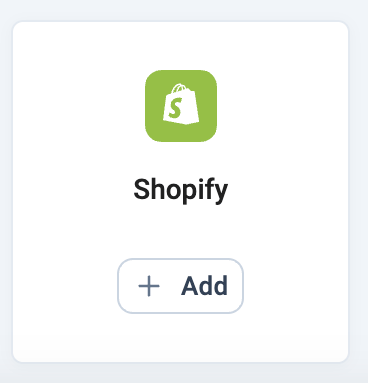
3. Zoek **Shopify** in de lijst en klik op **+ Toevoegen**.
 4. Klik onder **Shopify-authenticatie** op **Nieuwe authenticatie**.
5. In het dialoogvenster **Een nieuwe authenticatie maken**:
* Bevestig of wijzig de **authenticatienaam** (automatisch ingevuld met uw accountnaam).
* Voer uw **Shop-subdomein** in. U vindt dit in de URL van uw Shopify-beheeromgeving: [`https://admin.shopify.com/store/`](https://admin.shopify.com/store/)**`yoursubdomain`**.\
*Voorbeeld*: Als uw beheer-URL [`https://admin.shopify.com/store/yourcompanystore`](https://admin.shopify.com/store/yourcompanystore) is, voert u `yourcompanystore` in.
6. Klik op **Aanmaken**. Er wordt een Shopify-inlogvenster geopend. Log in om de verbinding te autoriseren.
7. Zodra u dit goedkeurt, ziet u de melding **Authenticatie voltooid** op de instellingenpagina.
8. Voer in het veld **Shopify-subdomein** onder het authenticatiegedeelte opnieuw uw shop-subdomein in.
9. Kies welke CloudTalk-nummers worden gebruikt voor:
* **Gekoppelde nummers (voor oproepen)**
* **Gekoppelde nummers voor SMS**
10. Klik op **Indienen** en vervolgens op **Voltooien** om de installatie te voltooien.
4. Klik onder **Shopify-authenticatie** op **Nieuwe authenticatie**.
5. In het dialoogvenster **Een nieuwe authenticatie maken**:
* Bevestig of wijzig de **authenticatienaam** (automatisch ingevuld met uw accountnaam).
* Voer uw **Shop-subdomein** in. U vindt dit in de URL van uw Shopify-beheeromgeving: [`https://admin.shopify.com/store/`](https://admin.shopify.com/store/)**`yoursubdomain`**.\
*Voorbeeld*: Als uw beheer-URL [`https://admin.shopify.com/store/yourcompanystore`](https://admin.shopify.com/store/yourcompanystore) is, voert u `yourcompanystore` in.
6. Klik op **Aanmaken**. Er wordt een Shopify-inlogvenster geopend. Log in om de verbinding te autoriseren.
7. Zodra u dit goedkeurt, ziet u de melding **Authenticatie voltooid** op de instellingenpagina.
8. Voer in het veld **Shopify-subdomein** onder het authenticatiegedeelte opnieuw uw shop-subdomein in.
9. Kies welke CloudTalk-nummers worden gebruikt voor:
* **Gekoppelde nummers (voor oproepen)**
* **Gekoppelde nummers voor SMS**
10. Klik op **Indienen** en vervolgens op **Voltooien** om de installatie te voltooien.
Shopify-integratie loskoppelen
Als u de Shopify-integratie met CloudTalk niet langer wilt gebruiken, volgt u deze stappen om deze te verwijderen:
1. Log in op uw CloudTalk Dashboard en ga via het menu aan de linkerkant naar **Account > Integraties**.
2. Zoek de integratie **Shopify** en klik op **Configureren**.
3. Scroll naar beneden en klik op **Integratie verwijderen**.
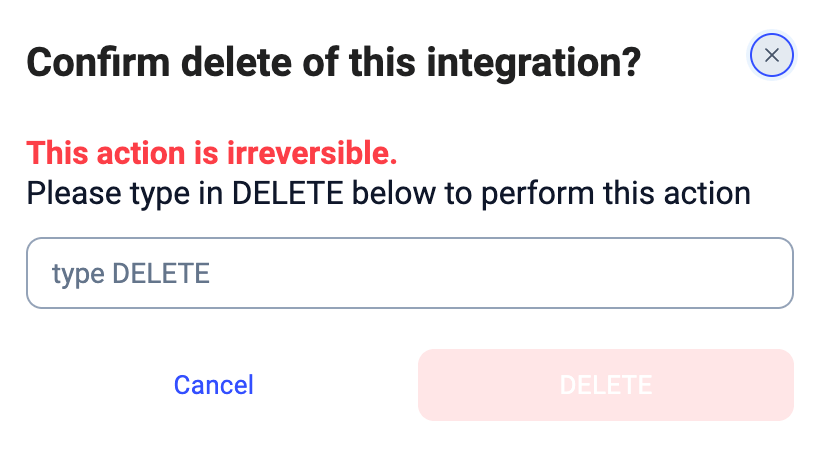
4. Typ ter bevestiging `DELETE` wanneer daarom wordt gevraagd en klik nogmaals op **Verwijderen**.
 De integratie met Shopify is nu verwijderd uit uw CloudTalk-account.
***
*Hulp nodig of een vraag?* Neem gewoon contact met ons op via ons [supportportal](https://support.cloudtalk.io/hc/en-us/requests/new?ticket_form_id=26305535257884), we helpen u graag verder.
## Related topics
- [Shopify gebruiken met CloudTalk](/nl/articles/11727412-using-shopify-with-cloudtalk.md)
- [Salesforce configureren](/nl/articles/3368501-configure-salesforce.md)
- [Greenhouse configureren](/nl/articles/11937842-configure-greenhouse.md)
This documentation is built and hosted on [Mintlify](https://mintlify.com), a developer documentation platform.
De integratie met Shopify is nu verwijderd uit uw CloudTalk-account.
***
*Hulp nodig of een vraag?* Neem gewoon contact met ons op via ons [supportportal](https://support.cloudtalk.io/hc/en-us/requests/new?ticket_form_id=26305535257884), we helpen u graag verder.
## Related topics
- [Shopify gebruiken met CloudTalk](/nl/articles/11727412-using-shopify-with-cloudtalk.md)
- [Salesforce configureren](/nl/articles/3368501-configure-salesforce.md)
- [Greenhouse configureren](/nl/articles/11937842-configure-greenhouse.md)
This documentation is built and hosted on [Mintlify](https://mintlify.com), a developer documentation platform.