> ## Documentation Index
> Fetch the complete documentation index at: https://help.cloudtalk.io/llms.txt
> Use this file to discover all available pages before exploring further.
# How to send an automatic SMS using Call Flow Designer
> A guide to automating the sending of SMSes via CFD in CloudTalk's Dashboard
The following article will detail how to set up your CFD for the example scenario above, we will automate the sending of an SMS to any caller that was not connected to an agent.
**User level:** Admin
***
There are situations where you may want to send an automatic SMS to customers via the unanswered or answered branch of your call flow. For example, if a customer can't reach an agent (full queue or no available agents) and is routed down the unanswered branch, you may want to send them an SMS with advice or a callback link.
Prerequisites
Before you start, make sure you have:
* A CloudTalk **Essential** plan or higher
* An **SMS-enabled number**
This setup applies to **inbound calls only**. If you don't need CFD-specific data to determine whether to send an SMS, you can also set this up with more flexibility in Workflow Automation. See our [Workflow Automation guides](/en/articles/10568412-workflow-automations-guide) for that approach.
***
Set Up the Call Flow
1\. From the **Dashboard**, click **Numbers**.
2\. In the **My numbers** tab, find the number you want to configure.
3\. Click **+ Configure** (or the flow name, if one exists) in the **Call Flow** column.
4\. Make sure your call flow prior to the SMS step is set up as desired (Greeting, Ring to, etc.).
5\. At the point where you want to send the SMS (typically on the **If unanswered** branch of a Ring to step), click the **`+`** button and add an **HTTP Request** step.
Configure the HTTP Request
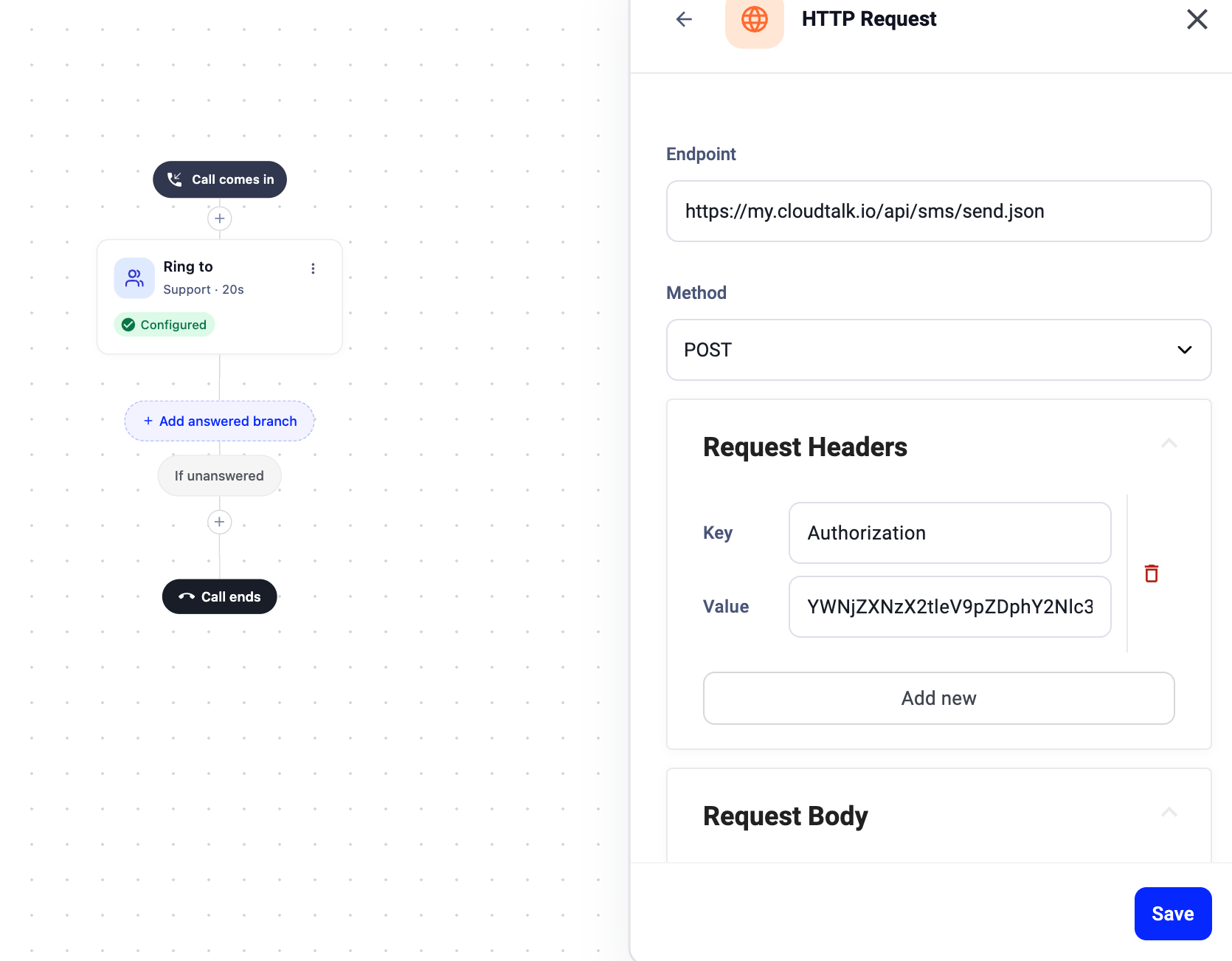
Set up the HTTP Request according to the [CloudTalk Send SMS API](/developers#tag/Sms/paths/~1sms~1send.json/post) documentation:
| Field | Value |
| - | - |
| **Endpoint** | `https://my.cloudtalk.io/api/sms/send.json` |
| **Method** | POST |
| **Authorization header (Key)** | `Authorization` |
| **Authorization header (Value)** | Your Basic Auth hash (created from your ACCESS KEY ID and ACCESS KEY SECRET in CloudTalk) |
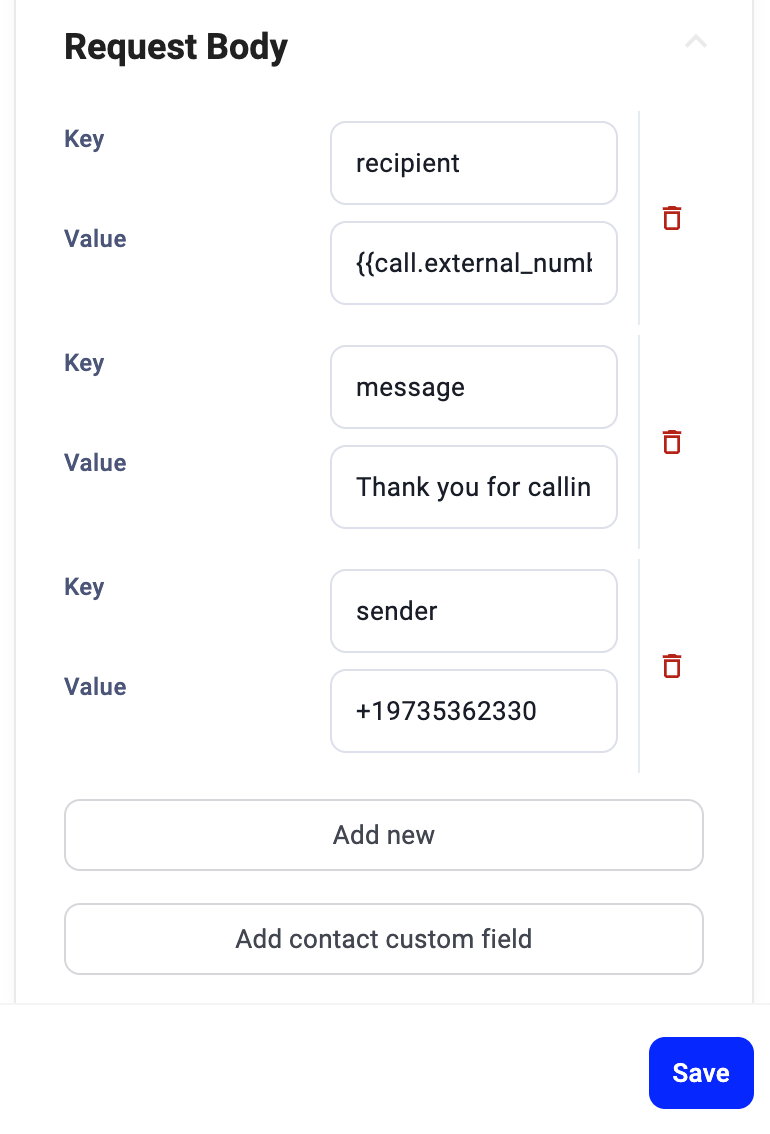
Request Body
Click **Add new** for each of the following key-value pairs:
**Recipient** (who receives the SMS):
* Key: `recipient`
* Value: `#{{call.external_number}}` (dynamically inserts the caller's phone number)
**Message** (the SMS content):
* Key: `message`
* Value: The text you want to send (e.g., "Thank you for calling! We'll get back to you shortly.")
**Sender** (which number sends the SMS):
* Key: `sender`
* Value: The phone number to send from, in international format with "+" (e.g., `+19735362330`)
* This can be a different number than the one the call flow is set up on
* It must be an SMS-capable, registered CloudTalk number
 ***
***
Important Notes
* Ensure the **Authorization** header begins with a capitalized "A."
* SMS sending is handled by the [CloudTalk API](/developers#tag/Sms/paths/~1sms~1send.json/post), which adheres to standard rate limits (60 requests per minute).
* All phone numbers in the HTTP Request must be in **international format**.
* The selected sender number must be **SMS-capable**.
***
*Need help or have a question?* Just reach out through our [Support portal](https://support.cloudtalk.io/hc/en-us/requests/new?ticket_form_id=26305535257884) — we’re here for you.
## Related topics
- [Routing & Call Flow Design guide](/en/articles/10559796-routing-call-flow-design-guide.md)
- [Call Flow Designer Guide](/en/articles/3669429-call-flow-designer-guide.md)
- [How to use Automatic Caller ID](/en/articles/8333267-how-to-use-automatic-caller-id.md)
This documentation is built and hosted on [Mintlify](https://mintlify.com), a developer documentation platform.