> ## Documentation Index
> Fetch the complete documentation index at: https://help.cloudtalk.io/llms.txt
> Use this file to discover all available pages before exploring further.
# How to Use SSO
> SSO setup for CloudTalk Phone or other CloudTalk applications can be adjusted from the Dashboard
**What is SSO?**
Instead of the typical username and password combination, *SSO (Single Sign On)* uses a third-party identity provider to authenticate a user. This feature simplifies the management of user credentials and can be used strategically to strengthen the security of an enterprise.
**User level:** Admin
***
SSO Setup for Admins on Dashboard
Settings for SSO must be adjusted by an admin through the Dashboard. From the left sidebar, click into **Account -> Settings**. By choosing the *Single Sign-on* header, you will be able to see available options for SSO in the form of toggle buttons.
 Admins can toggle *On/Off* to enable or to enforce:
* **Google SSO**
* **[Azure SSO](/en/articles/5912324-microsoft-azure-sso-setup)**
* **[Okta SSO](/en/articles/5996603-okta-sso-setup)**
* **Keycloak SSO**
* **[Onelogin SSO](/en/articles/6028218-onelogin-sso-setup)**
Admins can toggle *On/Off* to enable or to enforce:
* **Google SSO**
* **[Azure SSO](/en/articles/5912324-microsoft-azure-sso-setup)**
* **[Okta SSO](/en/articles/5996603-okta-sso-setup)**
* **Keycloak SSO**
* **[Onelogin SSO](/en/articles/6028218-onelogin-sso-setup)**
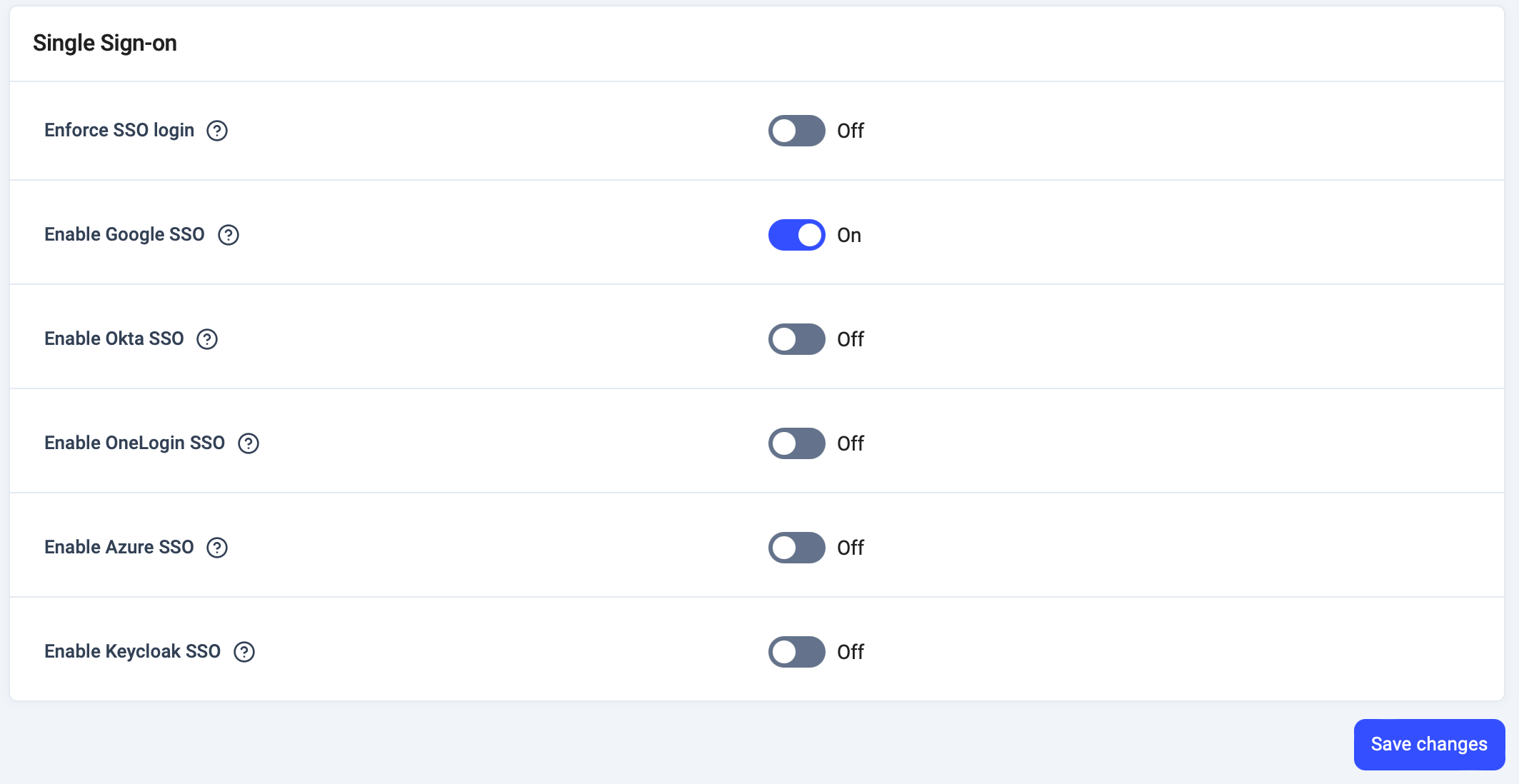 Logging in with an identity provider not listed may be possible—[contact a support agent](http://support@cloudtalk.io) for assistance. Toggling *on* an option requires users to have an account with the third-party provider.
Enforcing an option will necessitate agents using CloudTalk Phone or other CloudTalk services to use SSO as their required sign-in option, whereas enabling SSO simply offers the choice to use that sign-in option.
⚠️ Finish setting up and testing your SSO provider before turning on Enforce SSO. If Enforce SSO is on and no working SSO provider is connected, nobody on your account can log in, with SSO or a password, and you'll need to contact [Support](https://support.cloudtalk.io/hc/en-us/requests/new?ticket_form_id=26305535257884) to restore access.
Logging in with an identity provider not listed may be possible—[contact a support agent](http://support@cloudtalk.io) for assistance. Toggling *on* an option requires users to have an account with the third-party provider.
Enforcing an option will necessitate agents using CloudTalk Phone or other CloudTalk services to use SSO as their required sign-in option, whereas enabling SSO simply offers the choice to use that sign-in option.
⚠️ Finish setting up and testing your SSO provider before turning on Enforce SSO. If Enforce SSO is on and no working SSO provider is connected, nobody on your account can log in, with SSO or a password, and you'll need to contact [Support](https://support.cloudtalk.io/hc/en-us/requests/new?ticket_form_id=26305535257884) to restore access.
Google SSO
Google is the only third party which does not require additional setup information.
Okta, OneLogin, Azure, Keycloak SSO
Admin will be asked to fill in the following:
* **Client ID**
* **Client Secret**
* **Discovery URL** (sometimes called "Resource/Issuer URL")
* **Method** (GET or POST)
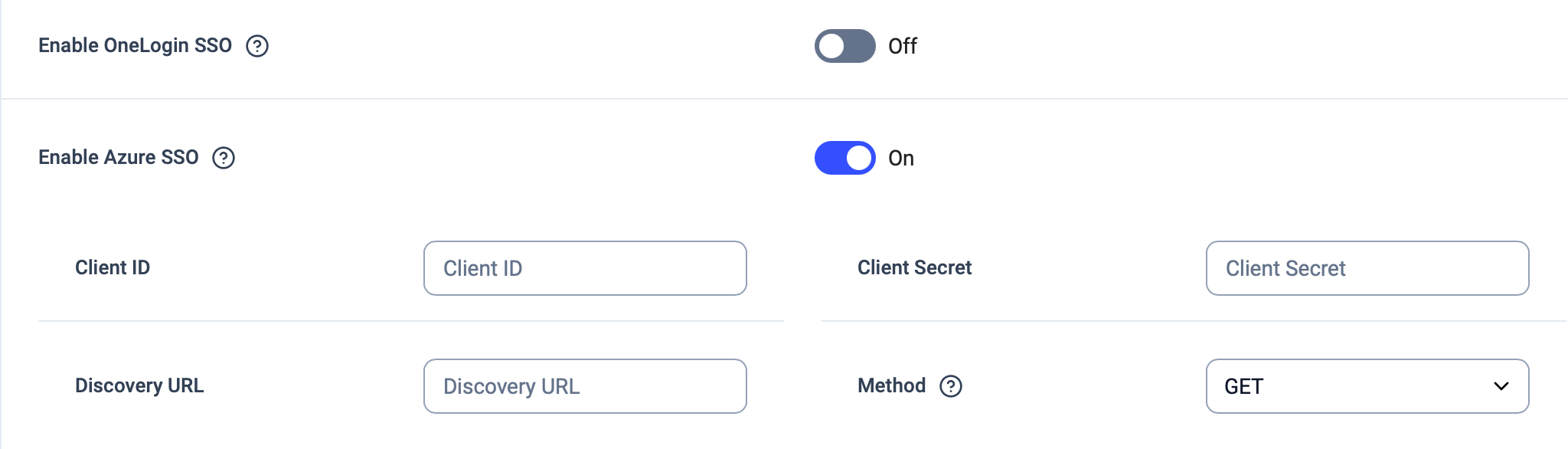 All of above must be found in through the respective identity provider's interface. Click to view our setup guides for [Azure](/en/articles/5912324-microsoft-azure-sso-setup), [Okta](/en/articles/5996603-okta-sso-setup), or [OneLogin](/en/articles/6028218-onelogin-sso-setup).\
\
**Discovery URL**
The Discovery URL can be found in the documentation or user profiles of the identity provider. It is sometimes referred to by another name such as "Resource" or "Issuer" URL and should look like an https link, as in the example below.
* For Microsoft Azure: [`https://login.microsoftonline.com/{tenant}/v2.0`](https://login.microsoftonline.com/%7Btenant%7D/v2.0)
* Where `{tenant}` must be replaced with the real tenant ID
All of above must be found in through the respective identity provider's interface. Click to view our setup guides for [Azure](/en/articles/5912324-microsoft-azure-sso-setup), [Okta](/en/articles/5996603-okta-sso-setup), or [OneLogin](/en/articles/6028218-onelogin-sso-setup).\
\
**Discovery URL**
The Discovery URL can be found in the documentation or user profiles of the identity provider. It is sometimes referred to by another name such as "Resource" or "Issuer" URL and should look like an https link, as in the example below.
* For Microsoft Azure: [`https://login.microsoftonline.com/{tenant}/v2.0`](https://login.microsoftonline.com/%7Btenant%7D/v2.0)
* Where `{tenant}` must be replaced with the real tenant ID
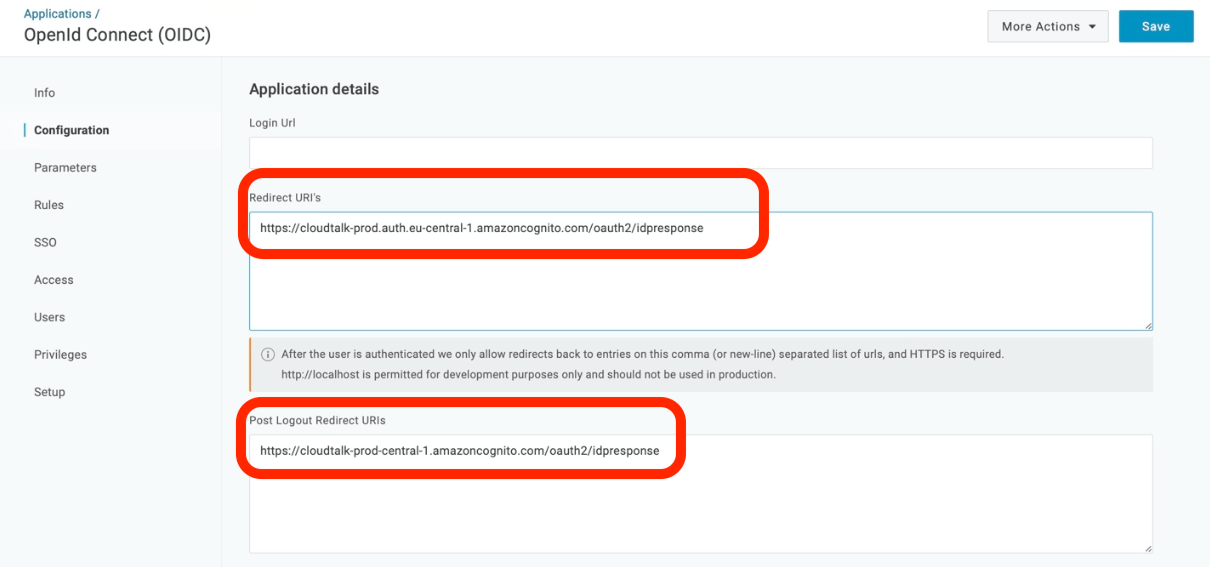
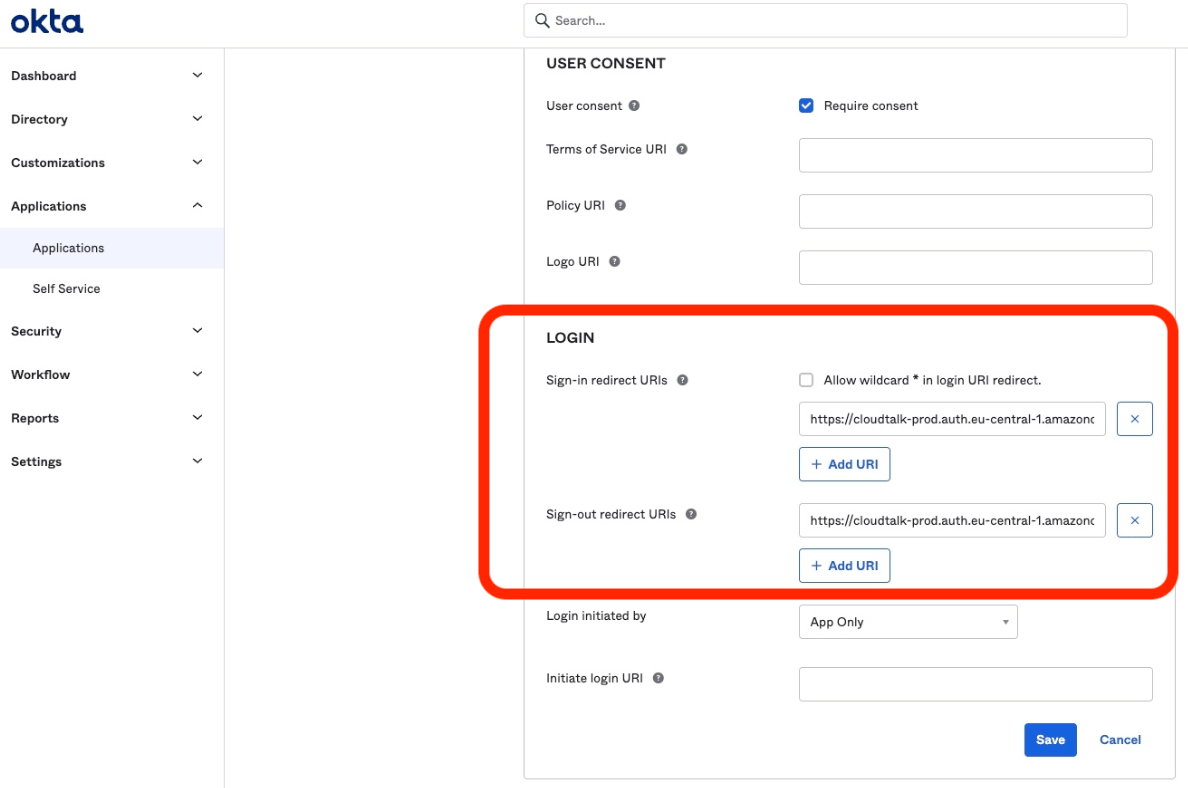
Redirect URI
For Okta, OneLogin, Azure, Keycloak, and other third-parties, customers will also need to set up a redirect URI within the configuration interface of the SSO provider. Setup varies per provider.
```
Provider interface redirect URIs (add both):
https://authsso.cloudtalk.io/oauth2/idpresponse
https://cloudtalk-prod.auth.eu-central-1.amazoncognito.com/oauth2/idpresponse
```
 ***
***
Login Screen for All
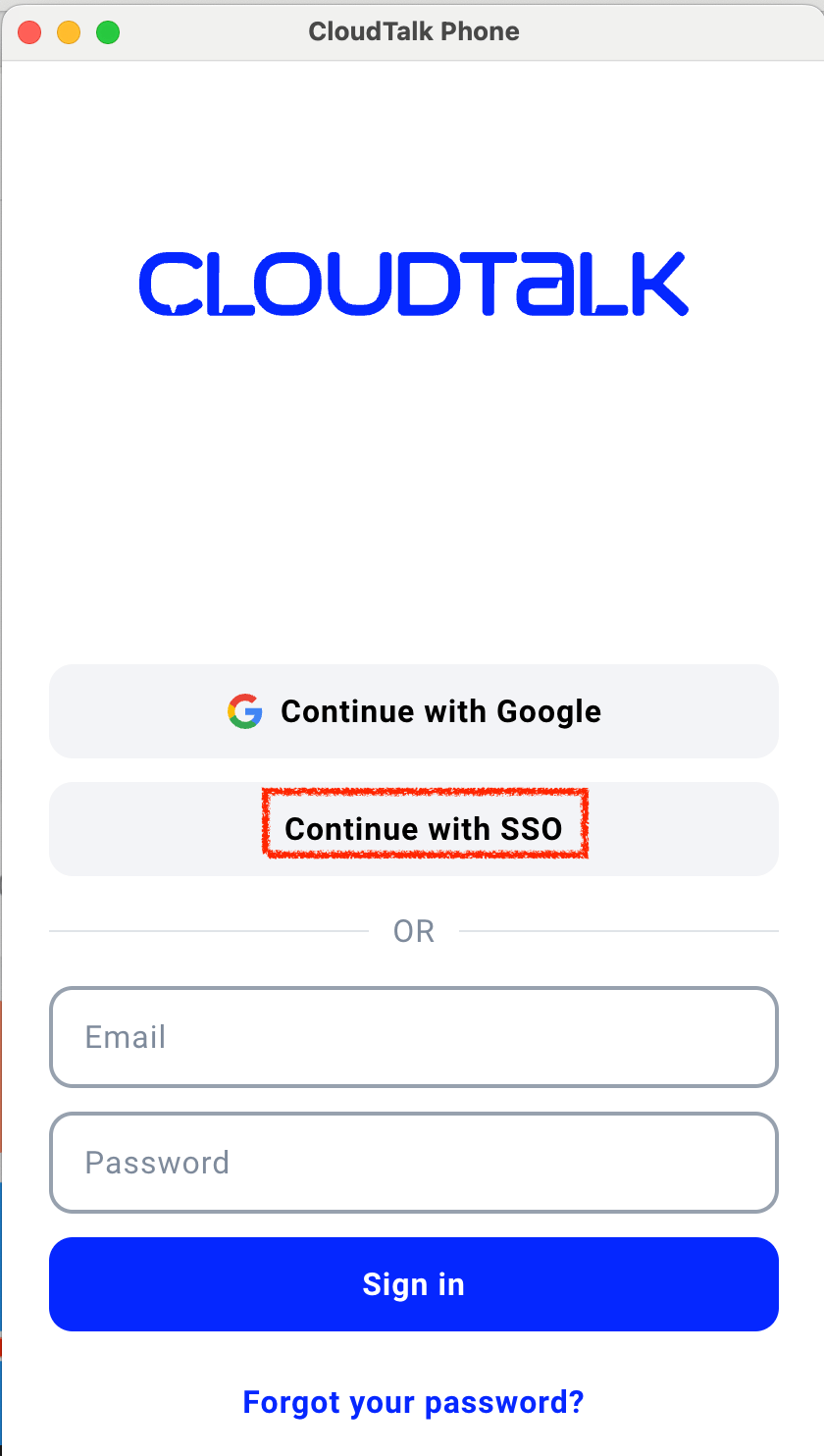 The settings chosen through the Dashboard will affect what users see on all CloudTalk login screens. When enabled, a button labeled **`Continue with SSO`** should be viewable on login screens*.*
Selecting this option, users will be prompted to enter their CloudTalk email.
The settings chosen through the Dashboard will affect what users see on all CloudTalk login screens. When enabled, a button labeled **`Continue with SSO`** should be viewable on login screens*.*
Selecting this option, users will be prompted to enter their CloudTalk email.
 Choose which available SSO you would like to login with.
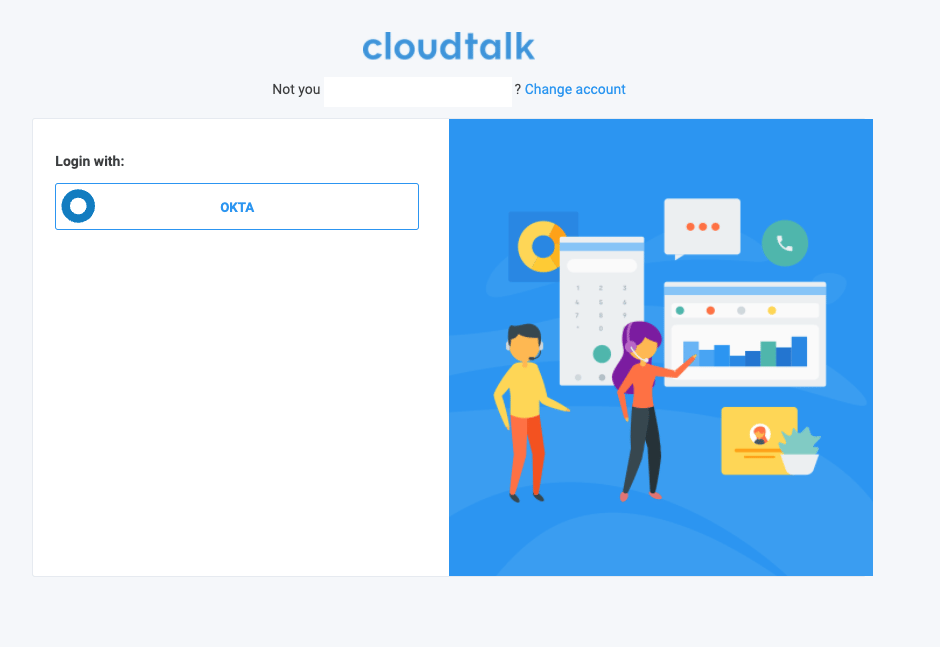 Depending on the third party provider, you may be redirected to another login screen, where you can enter your credentials for the third-party provider. If the login is successful, we will cross reference our user database against the third-party credentials, logging in the user when a correct match is found.
 As an admin, make sure that if you choose to enforce SSO from the **Dashboard** settings, all employees have access to the required sign-in.
***
*Need help or have a question?* Just reach out through our [Support portal](https://support.cloudtalk.io/hc/en-us/requests/new?ticket_form_id=26305535257884) — we’re here for you.
## Related topics
- [Account Settings Guide](/en/articles/10550593-account-settings-guide.md)
- [Can't log in to CloudTalk](/en/articles/16014347-can-t-log-in-to-cloudtalk.md)
- [OneLogin SSO Setup](/en/articles/6028218-onelogin-sso-setup.md)
This documentation is built and hosted on [Mintlify](https://mintlify.com), a developer documentation platform.
As an admin, make sure that if you choose to enforce SSO from the **Dashboard** settings, all employees have access to the required sign-in.
***
*Need help or have a question?* Just reach out through our [Support portal](https://support.cloudtalk.io/hc/en-us/requests/new?ticket_form_id=26305535257884) — we’re here for you.
## Related topics
- [Account Settings Guide](/en/articles/10550593-account-settings-guide.md)
- [Can't log in to CloudTalk](/en/articles/16014347-can-t-log-in-to-cloudtalk.md)
- [OneLogin SSO Setup](/en/articles/6028218-onelogin-sso-setup.md)
This documentation is built and hosted on [Mintlify](https://mintlify.com), a developer documentation platform.