> ## Documentation Index
> Fetch the complete documentation index at: https://help.cloudtalk.io/llms.txt
> Use this file to discover all available pages before exploring further.
# Using CloudTalk with Adobe Commerce (Magento)
> Explore how calls are handled and how information is synced between CloudTalk and Adobe Commerce (Magento)
This article provides a quick overview of how to view and update Adobe Commerce (Magento) deals directly within the CloudTalk interface.
**User level**: Agents, Admins and Supervisors
***
**Ready to configure the CloudTalk + Adobe Commerce (Magento) integration?**\
Follow the step-by-step instructions in our [Configure Adobe Commerce (Magento)](/en/articles/5775029-configure-adobe-commerce-magento) guide.
Call Logging and Data Exchange
Contact Sync
Adobe Commerce (Magento) customers are imported into CloudTalk as contacts when the integration is first saved. From that point, new contacts and updates from Adobe Commerce are [refreshed every 15 minutes.](/en/articles/14665732-how-cloudtalk-syncs-data-with-your-crm) Updates to existing contacts can also be made through the CloudTalk interface, and will sync back to Adobe Commerce.
To learn more about how CloudTalk handles duplicate entries, see the [Contact Merging](/en) guide.
Each synced contact includes a link to their Adobe Commerce profile and is tagged with `magento` in CloudTalk.
**Contact Field Mapping**
| **CloudTalk Contact** | **Sync Direction** | **Adobe Commerce Field** |
| - | - | - |
| Name | 2-way | Billing Address: First Name + Middle Name + Last Name |
| Title | 2-way | Billing Address: Prefix |
| Address | 2-way | Billing Address: Street |
| City | 2-way | Billing Address: City |
| Zip | 2-way | Billing Address: Postcode |
| Phone | 1-way (Adobe Commerce to CloudTalk) | Billing Address: Telephone |
| Email | 1-way (Adobe Commerce to CloudTalk) | Billing Address: Customer Email |
| External URL | 1-way (Adobe Commerce to CloudTalk) | Built from Adobe Commerce Customer ID, e.g. `https://example.com/admin/customer/index/edit/id/{id}` |
| Company | 1-way (CloudTalk to Adobe Commerce) | Billing Address: Company |
| Website | Not synced | No field |
Orders
Orders placed before the integration was set up are not automatically synchronized into CloudTalk. A CloudTalk support member can do this manually [on request.](https://support.cloudtalk.io/hc/en-us/requests/new?ticket_form_id=26305535257884) All new and updated orders from the time of installation are synchronized automatically.
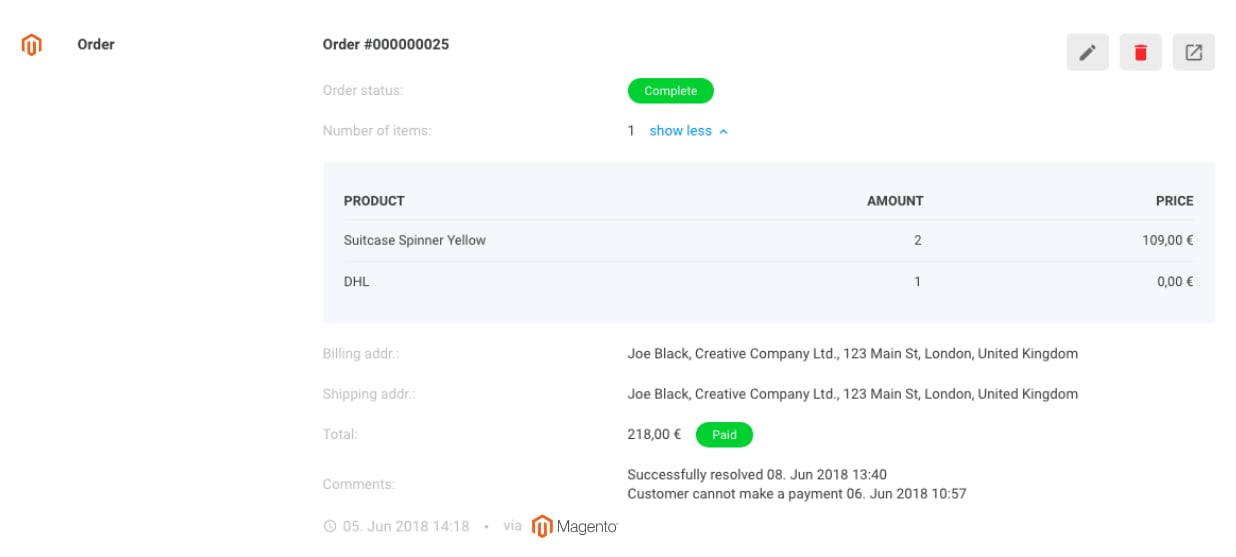 Order data is displayed alongside customer information under Contact Info. From the CloudTalk Dashboard, go to the Contacts tab and click the magnifying glass next to the relevant contact.
With Adobe Commerce integrated, you can view:
* Order ID
* Order status (processed, pending, etc.)
* List of individual items purchased
* Shipping method
* Billing and delivery address
* Total amount and payment status (paid/unpaid)
* Comments on the order from Adobe Commerce
* Date and time the order was placed
* Quick link to the order detail in Adobe Commerce
Order data is displayed alongside customer information under Contact Info. From the CloudTalk Dashboard, go to the Contacts tab and click the magnifying glass next to the relevant contact.
With Adobe Commerce integrated, you can view:
* Order ID
* Order status (processed, pending, etc.)
* List of individual items purchased
* Shipping method
* Billing and delivery address
* Total amount and payment status (paid/unpaid)
* Comments on the order from Adobe Commerce
* Date and time the order was placed
* Quick link to the order detail in Adobe Commerce
Syncing from CloudTalk to Adobe Commerce
By clicking the edit icon on an order, agents can also push changes back to Adobe Commerce:
* Add notes to Adobe Commerce orders
* Change the order status for open orders (Hold, Unhold, Cancel)
These actions can be performed while agents are on a call with the customer.
***
*Need help or have a question?* Reach out through our [Support portal](https://support.cloudtalk.io/hc/en-us/requests/new?ticket_form_id=26305535257884) — we are here for you.
## Related topics
- [Configure Adobe Commerce (Magento)](/en/articles/5775029-configure-adobe-commerce-magento.md)
- [Integrations guide](/en/articles/10570091-integrations-guide.md)
- [Using Shopify with CloudTalk](/en/articles/11727412-using-shopify-with-cloudtalk.md)
This documentation is built and hosted on [Mintlify](https://mintlify.com), a developer documentation platform.