> ## Documentation Index
> Fetch the complete documentation index at: https://help.cloudtalk.io/llms.txt
> Use this file to discover all available pages before exploring further.
# Where can I find my invoices in CloudTalk?
> Information regarding the sending and receiving of CloudTalk invoices
This article explains where to access all your CloudTalk invoices, how to download them, and how invoice delivery works.
**User level**:
* Admin
***
View and Download Invoices in the CloudTalk Dashboard
You can now find all of your invoices directly in the Dashboard.
How to access your invoices
1. Go to **Dashboard > Settings > Invoices**
2. You will see a list of all invoices issued for:
* plans
* add-ons
* phone numbers
* call packages
* credit top-ups
* and more
What you can do in the Invoices section
* **Download invoice PDFs**\
Click the download icon to save any invoice.
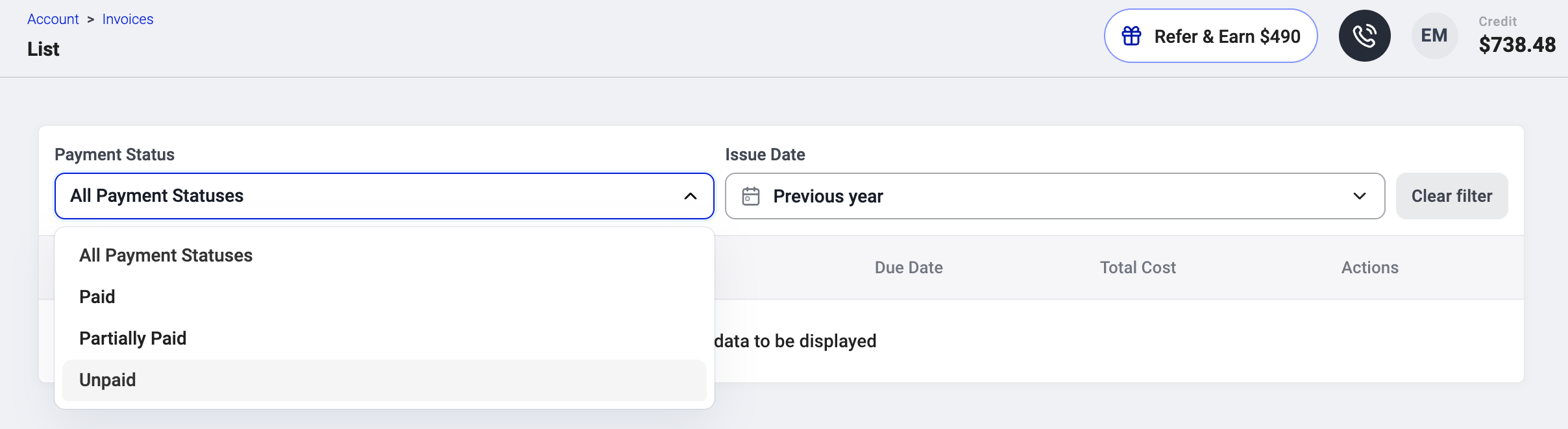
 * **Filter invoices by payment status**
* Paid
* Partially paid
* Unpaid
* All statuses
* **Filter by issue date**
* Previous month
* Previous 3 months
* Previous 6 months
* Previous year
* Custom date range
* **Filter invoices by payment status**
* Paid
* Partially paid
* Unpaid
* All statuses
* **Filter by issue date**
* Previous month
* Previous 3 months
* Previous 6 months
* Previous year
* Custom date range
 * **View invoice details**\
Including invoice number, payment status, total billed, and due date.
The list is sorted from newest to oldest. Hidden invoices still appear in the list, but the overdue badge is removed.
* **View invoice details**\
Including invoice number, payment status, total billed, and due date.
The list is sorted from newest to oldest. Hidden invoices still appear in the list, but the overdue badge is removed.
Receiving Invoices by Email
You can manage invoice recipients in:\
**Dashboard > Settings > Billing.**
All email addresses listed in this section will receive new invoices as PDF attachments at the beginning of each billing cycle.
Invoice emails include:
* Company name
* Billing & delivery address
* Issue, delivery, and due dates
* Invoice number
* Item details and descriptions
* VAT number (if applicable)
* Total amount / amount paid / amount due
**Important notice:** If you set up billing addresses as described above and still didn't receive an email, please check **Inbox**, **Spam** and **Promotion** sections.
***
*Need help or have a question?* Just reach out through our [Support portal](https://support.cloudtalk.io/hc/en-us/requests/new?ticket_form_id=26305535257884) — we’re here for you.
## Related topics
- [Call Scoring](/en/articles/12353357-call-scoring.md)
- [US taxes, charges and fees](/en/articles/9734196-us-taxes-charges-and-fees.md)
- [Where can I find my call charges?](/en/articles/5591773-where-can-i-find-my-call-charges.md)
This documentation is built and hosted on [Mintlify](https://mintlify.com), a developer documentation platform.