> ## Documentation Index
> Fetch the complete documentation index at: https://help.cloudtalk.io/llms.txt
> Use this file to discover all available pages before exploring further.
# Duplicating a campaign
> Copy an existing AI Sales Dialer campaign's settings into a new one, and see what is and isn't carried over.
Learn how to copy an existing campaign's settings into a new one, and what is and isn't carried over.
**User level**: Admin
***
When you want to reuse a campaign's setup without building it from scratch, duplicate it. This copies the configuration into a new campaign so you can adjust what you need and start fresh.
How to duplicate a campaign
1. Go to **Dialer (new) > Campaigns**.
2. Hover over the campaign row and click the **Duplicate campaign** icon (the copy icon).
 3. A new campaign opens with the name **"Copy of \[original name]"** and all settings from the original.
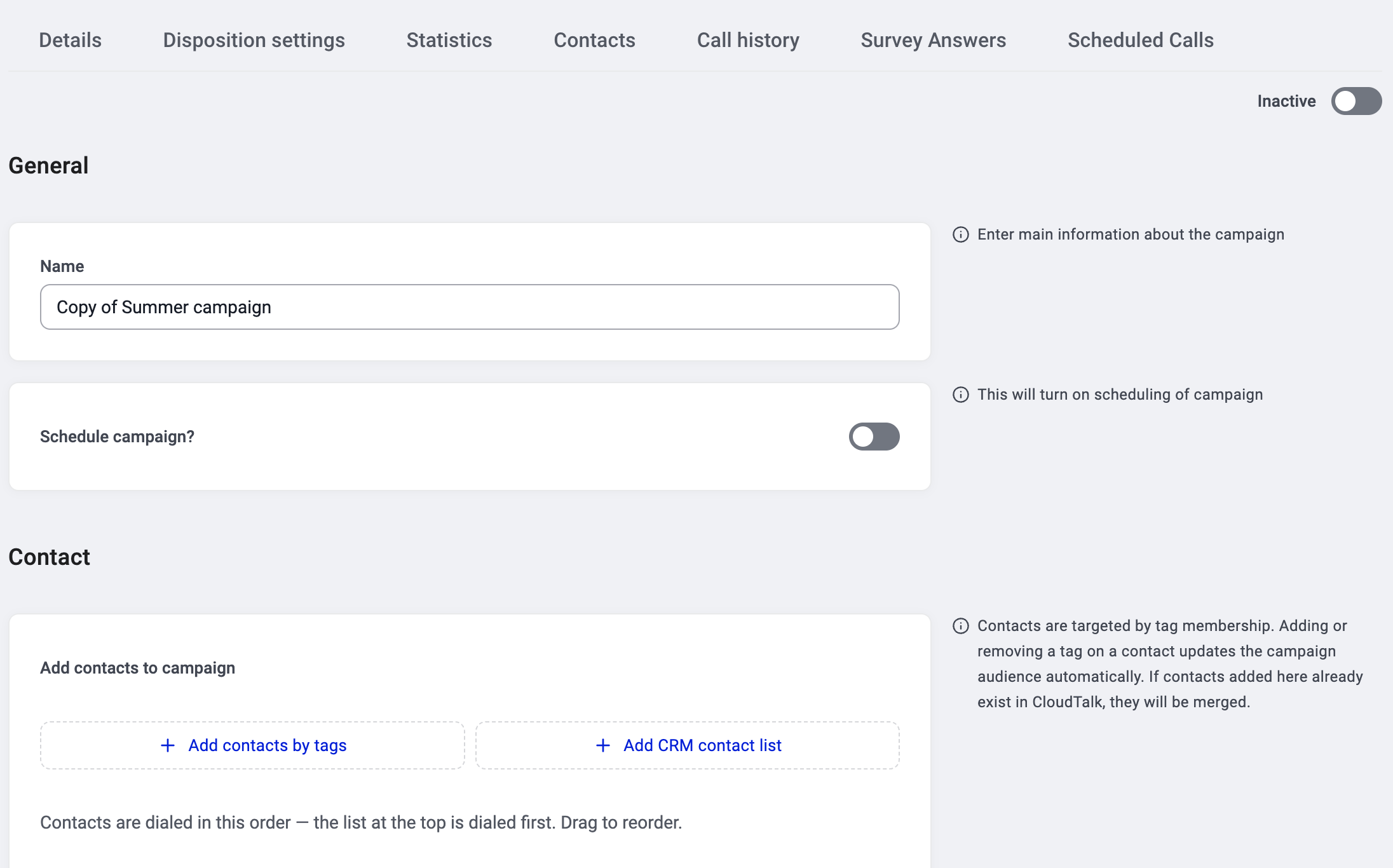 4. The campaign starts as **Inactive**. Review and edit anything you want to change.
5. Toggle to **Active** when you're ready to start dialing.
4. The campaign starts as **Inactive**. Review and edit anything you want to change.
5. Toggle to **Active** when you're ready to start dialing.
What gets copied
| Copied | Not copied |
| - | - |
| Campaign name (with "Copy of" prepended) | Contact sources (tags and CRM lists) |
| Dialing mode (sequential or parallel settings) | Contact queue |
| Calling setup (attempts, wait times, recording, etc.) | Call history and statistics |
| Dispositions and CRM mappings | Agent session data |
| Call script | |
| Survey | |
| Agent queue controls (skip, reorder, remove) | |
⚠️ **Contact sources are not copied.** The duplicated campaign's Contact section starts empty. You need to add your tags and/or CRM lists again. This lets you point the copy at a different audience without inheriting the original's contacts.
When to use duplicate
* **Running the same setup on a new audience.** Duplicate it, add different tags, and go.
* **Seasonal repeats.** Duplicate last quarter's campaign, update the name and contacts.
* **A/B testing.** Duplicate a campaign, change one setting (e.g., a different script or dispositions), and compare results.
* **Template campaigns.** Set up one "master" campaign with your standard settings and duplicate it whenever you launch something new.
Good to know
* **The duplicate starts as Inactive.** It won't dial until you toggle it to Active.
* **Statistics start at zero.** The duplicate has no history.
* **You can edit everything after duplicating.** Nothing is locked.
* **Contact priority is set by drag order.** After adding your tags and CRM lists, drag them to set the dial priority. The list at the top is dialed first. See [How contacts are prioritized](/en/articles/17025701-how-contacts-are-prioritized).
***
*Need help or have a question?* Just reach out through our [Support portal](https://support.cloudtalk.io/hc/en-us/requests/new?ticket_form_id=26305535257884) — we’re here for you.
## Related topics
- [Migrating from Power Dialer / AI Sales Dialer Legacy](/en/articles/17025728-migrating-from-power-dialer-ai-sales-dialer-legacy.md)
- [Routing & Call Flow Design guide](/en/articles/10559796-routing-call-flow-design-guide.md)
- [List campaigns](/api-reference/campaigns/list-campaigns.md)
This documentation is built and hosted on [Mintlify](https://mintlify.com), a developer documentation platform.