> ## Documentation Index
> Fetch the complete documentation index at: https://help.cloudtalk.io/llms.txt
> Use this file to discover all available pages before exploring further.
# Sequential mode (1 line)
> Run one call at a time in the AI Sales Dialer: how sequential mode works, when to use it, and how it differs from parallel mode.
Learn how sequential mode works, when to use it, and how it differs from parallel mode.
**User Level**: Admin, Agent
***
**Sequential mode** dials one contact at a time. It's the right choice when each conversation matters and your agents want a moment to prepare before each call.
Setting up sequential mode
Sequential mode is the default. In **Step 2: Contact** of the campaign creation wizard, the **Parallel Calling** toggle is OFF by default, which means the campaign dials one contact at a time.
1. Go to **Dialer (new) > Campaigns** and click **+ Add campaign**.
2. Complete Step 1 (name).
3. In **Step 2: Contact**, add your contacts and leave the **Parallel Calling** toggle OFF.
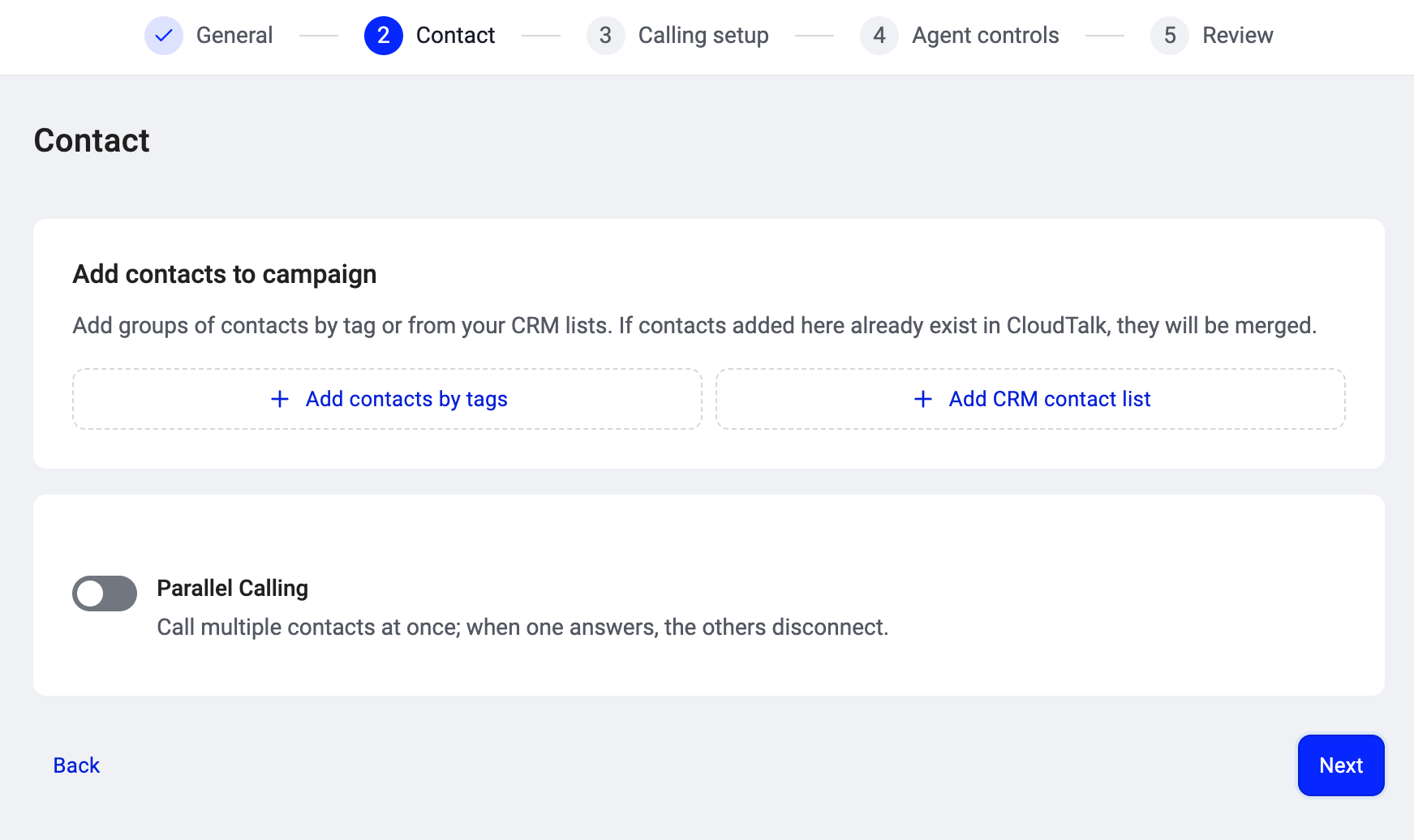 4. Finish the remaining steps and create the campaign. See [Setting up a campaign in the AI Sales Dialer](/en/articles/17025659-setting-up-a-campaign) for the full walkthrough.
💡 Sequential mode does not require any add-on. Every AI Sales Dialer account can run sequential campaigns.
To switch to parallel mode, turn the **Parallel Calling** toggle ON in the same step and set the number of simultaneous lines. See [Parallel mode (2+ lines)](/en/articles/17025675-parallel-mode-2-lines).
4. Finish the remaining steps and create the campaign. See [Setting up a campaign in the AI Sales Dialer](/en/articles/17025659-setting-up-a-campaign) for the full walkthrough.
💡 Sequential mode does not require any add-on. Every AI Sales Dialer account can run sequential campaigns.
To switch to parallel mode, turn the **Parallel Calling** toggle ON in the same step and set the number of simultaneous lines. See [Parallel mode (2+ lines)](/en/articles/17025675-parallel-mode-2-lines).
How sequential mode differs from parallel
| | Sequential (1 line) | Parallel (2+ lines) |
| - | - | - |
| **Calls at once** | 1 | Up to 5 |
| **Who places the call** | The agent clicks to dial | The dialer dials automatically |
| **Agent preparation** | Agent reviews the contact before dialing | Contact details appear when someone answers |
| **Voicemail detection** | Not active. Agent hears the greeting and decides what to do. | Active. Machines are filtered before the agent is connected. |
| **Voicemail drop** | Manual only. Agent clicks to leave a message. | Automatic when a machine is detected (if a recording is configured). Agent can also drop manually. |
| **Add-on required** | No | Yes (Parallel Calling add-on plus a per-agent seat) |
| **Best for** | High-value, prepared conversations on smaller lists | High-volume lists where maximizing talk time matters |
How it works
1. The dialer serves you the next contact and shows their details (name, number, company, CRM data).
2. You review the information, then **place the call** when you're ready.
3. You talk. Use the script or survey if the campaign has one. Take notes on the call.
4. The call ends. **Set a disposition** to record the outcome. This is required before the dialer moves you forward.
5. If **automatic dialing** is on, a countdown starts and the next call is placed when it reaches zero. Click **Next Call** to skip the countdown. If automatic dialing is off, you click to dial manually.
6. The next contact is served and the cycle repeats.
Because only one call is active at a time, there's no risk of dropped connections or missed answers. Every call is one your agent chose to place.
When to use sequential mode
Sequential mode works best when:
* Conversations are high-value and need preparation (enterprise sales, renewals, sensitive follow-ups).
* Your list is smaller and every contact deserves full attention.
* Agents are newer and benefit from reviewing each contact before dialing.
If your team needs to maximize the number of conversations per hour on a large list, consider [Parallel mode (2+ lines)](/en/articles/17025675-parallel-mode-2-lines) instead.
What agents can do during a session
Everything in [Running a campaign in the AI Sales Dialer](/en/articles/17025679-running-a-campaign) applies. In sequential mode specifically:
* **Skip, remove, and reorder** controls (if enabled by your admin) are available between calls but disabled while a call is in progress or the auto-dial countdown is running.
* **Schedule a callback** for contacts who ask to be called later. See [Scheduled callbacks](/en/articles/17025683-scheduled-callbacks).
* **Drop a voicemail** manually when you hear an answering machine greeting. In sequential mode there is no automatic voicemail detection; you decide whether to leave a message or hang up.
* **Pause** your session any time to take a break. Your held contacts stay assigned to you.
Good to know
* **Voicemail detection does not run in sequential mode.** If the call reaches an answering machine, the agent hears the greeting and decides what to do (leave a voicemail drop, hang up, etc.). Automatic filtering of answering machines is a parallel-mode feature.
* **Each real call counts as an attempt**, whether or not the contact answered. A dial that never reached the server (e.g., an immediate network failure) does not count.
* The dialer respects the campaign's retry and cooldown rules the same way in both modes.
***
*Need help or have a question?* Just reach out through our [Support portal](https://support.cloudtalk.io/hc/en-us/requests/new?ticket_form_id=26305535257884) — we’re here for you.
## Related topics
- [Parallel mode (2+ lines)](/en/articles/17025675-parallel-mode-2-lines.md)
- [AI Sales Dialer overview](/en/articles/17025655-ai-sales-dialer-overview.md)
- [AI Sales Dialer: Plans, add-ons and how to get access](/en/articles/17025709-ai-sales-dialer-plans-add-ons-and-how-to-get-access.md)
This documentation is built and hosted on [Mintlify](https://mintlify.com), a developer documentation platform.