> ## Documentation Index
> Fetch the complete documentation index at: https://help.cloudtalk.io/llms.txt
> Use this file to discover all available pages before exploring further.
# AI Sales Dialer overview
> What the AI Sales Dialer is, sequential vs. parallel mode, and how it differs from Power Dialer, AI Sales Dialer Legacy, and Smart Dialer.
Learn what the AI Sales Dialer is, how sequential and parallel mode differ, and how to tell which dialer your account is using.
**User level**: Admin, Agent, Supervisor
***
The AI Sales Dialer is CloudTalk's outbound calling engine for running high-volume call campaigns. You build an audience, the dialer works through it for your agents, and every call is captured with an outcome so you always know where a campaign stands.
The two dialing modes
You choose the mode per campaign when you set it up.
* **Sequential mode (1 line).** The dialer serves one contact at a time. Your agent reviews the contact, places the call, talks, and sets an outcome before moving to the next. Best for considered, higher-value conversations where preparation matters. See [Sequential mode (1 line)](/en/articles/17025671-sequential-mode-1-line).
- **Parallel mode (2+ lines).** The dialer calls several contacts at once (up to 5 lines) and connects your agent to whoever answers first, dropping the rest. Best for maximizing talk time on large lists. Parallel mode is a paid add-on and each agent using it needs a Parallel Calling seat. See [Parallel mode (2+ lines)](/en/articles/17025675-parallel-mode-2-lines).
Which dialer am I using?
| **You see** | **What it is** | **Status** |
| - | - | - |
| **AI Sales Dialer** | The current product. Sequential and parallel campaign dialing. | Current |
| **AI Sales Dialer Legacy** | The previous version of the AI Sales Dialer. Being phased out. | Legacy |
| **Power Dialer Legacy** | An older campaign dialer. No longer receiving new features. | Legacy |
| **Smart Dialer** | A separate click-to-call tool that dials numbers you collect from a web page or CRM. Not a campaign dialer. | Separate feature |
In the CloudTalk Phone app under **Campaign dialers**, you'll see a **Dialer** button. Clicking it shows two options:
* **Dialer** ("What you use today"): the legacy AI Sales Dialer
* **Dialer** with a **New** badge ("Try the new dialer"): the new AI Sales Dialer described in these articles
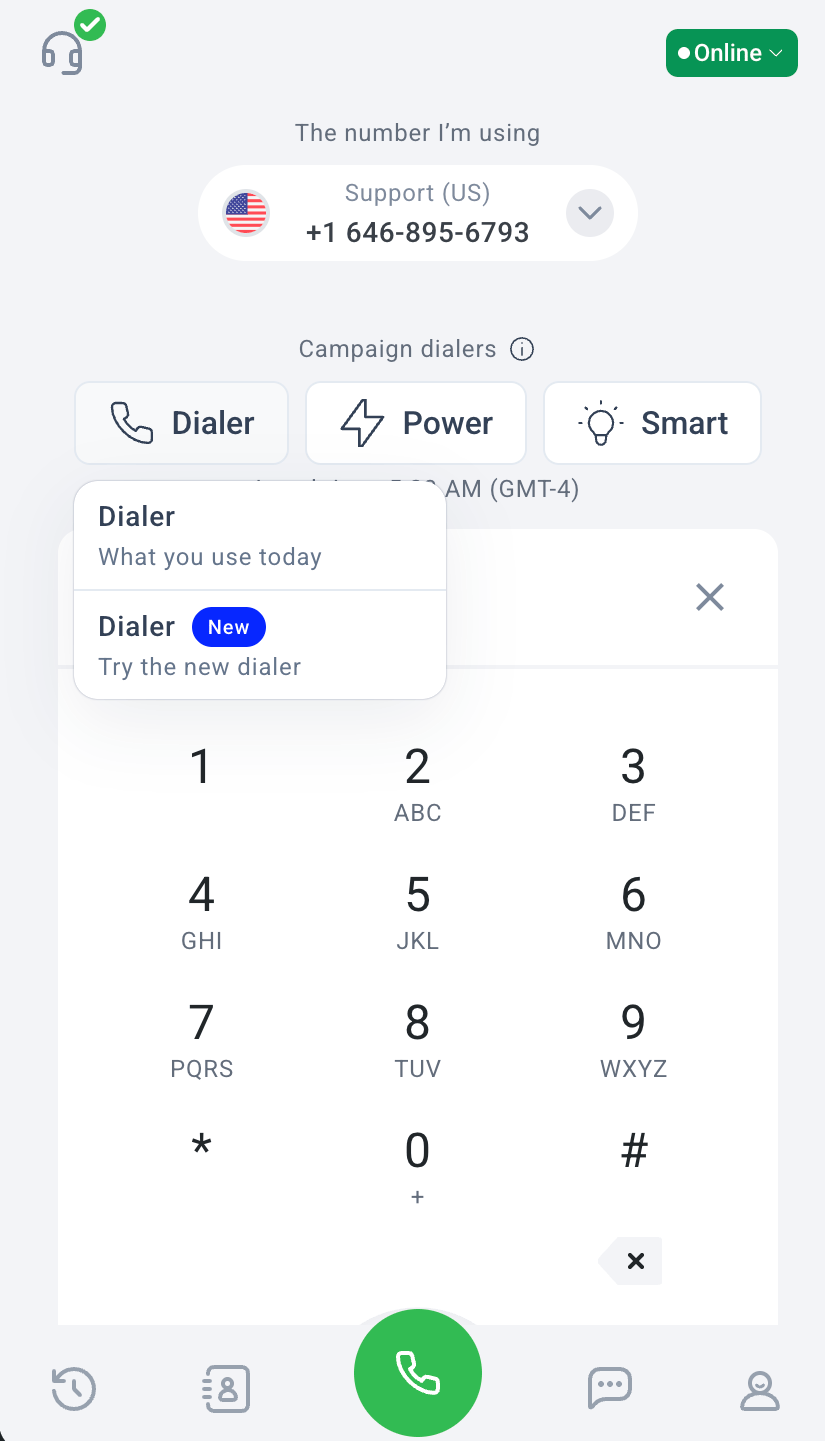 If you see separate **Power Dialer** and **Smart Dialer** buttons instead, you're on the older legacy products.
💡 Not sure which you have, or want to move to the new AI Sales Dialer? See [Migrating from Power Dialer / AI Sales Dialer Legacy](/en/articles/17025728-migrating-from-power-dialer-ai-sales-dialer-legacy).
If you see separate **Power Dialer** and **Smart Dialer** buttons instead, you're on the older legacy products.
💡 Not sure which you have, or want to move to the new AI Sales Dialer? See [Migrating from Power Dialer / AI Sales Dialer Legacy](/en/articles/17025728-migrating-from-power-dialer-ai-sales-dialer-legacy).
What makes the AI Sales Dialer different
Compared to the Power Dialer and the previous AI Sales Dialer, the new version brings:
* Faster, more reliable contact queueing that never serves the same contact to two agents
* Multi-number contacts: the dialer can try more than one number per contact
* A dedicated statistics view with disposition breakdown, conversion tracking, and exports
* Dispositions that are CloudTalk tags, so outcomes flow straight into your reports and CRM
* Voicemail drop, scheduled callbacks, warm transfer, and contact prioritization built in
* Fresh contact prioritization: choose whether to dial new contacts before retrying earlier no-answers
* Tag and CRM list prioritization: rank audience segments so higher-value groups dial first
Key concepts at a glance
* **Campaign.** A list of contacts plus the rules for how your team calls them. You create campaigns in the Dashboard.
- **Disposition.** How an agent records what happened on a call ("Interested," "Not interested," "Wrong number," etc.). Dispositions are required before moving to the next contact, so no call goes unrecorded.
* **Contact queue.** When an agent starts a session, the dialer reserves a batch of contacts for them and serves them one by one (sequential) or in groups (parallel). Admins set the batch size per campaign with **Session lock size** (15 by default). The queue refills automatically as contacts are worked.
- **Session.** An agent's active dialing window on a campaign. Start a session to begin calling; pause or end it when you're done.
***
*Need help or have a question?* Just reach out through our [Support portal](https://support.cloudtalk.io/hc/en-us/requests/new?ticket_form_id=26305535257884). We're here for you.
## Related topics
- [Introducing the AI Sales Dialer](/en/articles/17212695-introducing-the-ai-sales-dialer.md)
- [Migrating from Power Dialer / AI Sales Dialer Legacy](/en/articles/17025728-migrating-from-power-dialer-ai-sales-dialer-legacy.md)
- [Conversational Intelligence in the AI Sales Dialer](/en/articles/17025704-conversational-intelligence-in-the-ai-sales-dialer.md)
This documentation is built and hosted on [Mintlify](https://mintlify.com), a developer documentation platform.