> ## Documentation Index
> Fetch the complete documentation index at: https://help.cloudtalk.io/llms.txt
> Use this file to discover all available pages before exploring further.
# How to access and generate your CloudTalk API keys
> Learn where to find your API Keys in CloudTalk and how to generate a new key and secret for use with integrations and the CloudTalk API.
In this article, you will learn where to find your API Keys in the CloudTalk Dashboard and how to generate a new key and secret. API Keys are required when connecting CloudTalk to third-party tools such as Zapier, Make, and custom integrations.
**User level**: Admin
***
What are API Keys?
CloudTalk API Keys are a pair of credentials, an **Access Key ID** and an **Access Key Secret**, used to authenticate requests to the CloudTalk API. They are required any time you connect CloudTalk to an external platform or automation tool.
⚠️ API access is available on the **Essential plan and above**. If you do not see the API Keys tab, verify that your account has been upgraded to the correct plan.
Where to find your API Keys
API Keys are located in the **Settings** section of your CloudTalk Dashboard.
1. Log in to your [CloudTalk Dashboard](https://dashboard.cloudtalk.io).
2. In the left-hand navigation, go to **Account > Settings**.
3. Select the **API Keys** tab at the top of the page.
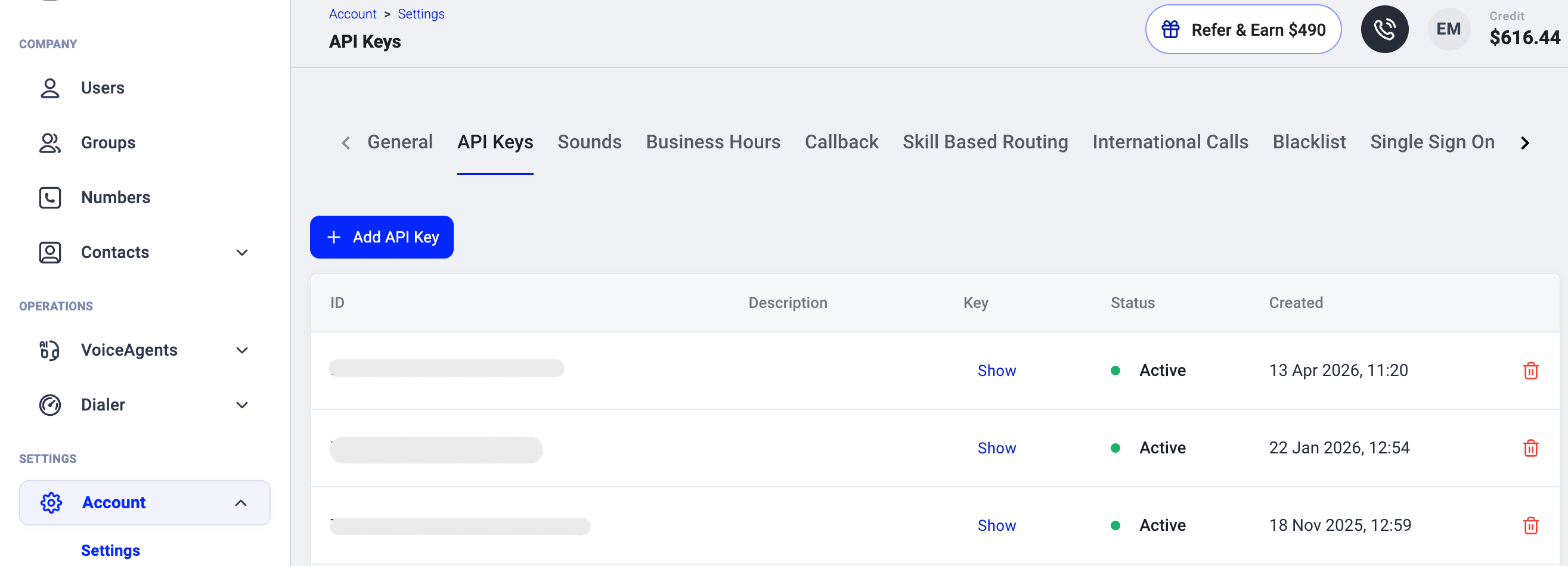 The direct URL is: [dashboard.cloudtalk.io/menu/account/settings/API-keys](https://dashboard.cloudtalk.io/menu/account/settings/API-keys)
How to generate a new API Key
1. Navigate to **Account > Settings > API Keys** as described above.
2. Click the **`+ Add API Key`** button.
3. A new **Access Key ID** and **Access Key Secret** will be generated.
4. Copy and store both values securely. You can view your secret at any time by clicking the **Show** button next to the key on the API Keys page.
⚠️ Treat your API Key Secret like a password. Do not share it or store it in an unsecured location.
Common uses for API Keys
Once you have your API Key ID and Secret, you can use them to authenticate with:
* **Zapier**: when connecting a new CloudTalk account in the Zap editor to trigger or action on calls, SMS, and contacts
* **HubSpot Workflows**: when triggering outbound VoiceAgent calls or sending SMS via CloudTalk's API as a workflow action
* **Pipedrive Automations**: when sending webhook requests to CloudTalk, for example to trigger SMS on deal stage changes
* **CloudTalk Workflow Automations**: when setting up API request actions inside the Dashboard's built-in automation builder
* **AI assistants (MCP)**: when connecting Claude, Cursor, or another AI assistant to your CloudTalk account. See [Connect AI Assistants to CloudTalk (MCP)](/en/articles/connect-ai-assistants-to-cloudtalk-mcp).
* **Direct API calls**: using Basic Authentication with the CloudTalk REST API for custom integrations or developer testing (for example in Postman). See the [CloudTalk API Reference](/developers) for all available endpoints.
Troubleshooting
* **API Keys tab not visible**: Confirm your account is on the Essential plan or higher and that you are logged in with an Admin role. If the tab is still absent after verifying your plan, contact CloudTalk Support.
* **Authentication errors**: Ensure there are no extra spaces when pasting the Key ID or Secret. Generate a new key pair if the issue persists.
* **404 or "Not a valid request" errors**: Make sure you are using the correct API base URL: `https://api.cloudtalk.io`. The dashboard URL (`my.cloudtalk.io`) does not serve the public API and will return errors if used in API requests. All endpoint paths must also end with `.json`.
For full API documentation, visit [developers.cloudtalk.io](/developers).
***
*Need help or have a question?* Just reach out through our [Support portal](https://support.cloudtalk.io/hc/en-us/requests/new?ticket_form_id=26305535257884) - we're here for you.
## Related topics
- [Integrating a custom or in-house CRM with CloudTalk](/en/articles/16012908-integrating-a-custom-or-in-house-crm-with-cloudtalk.md)
- [Connect AI Assistants to CloudTalk (MCP)](/en/articles/connect-ai-assistants-to-cloudtalk-mcp.md)
- [Triggering a VoiceAgent Call from Zoho Desk](/en/articles/15442851-triggering-a-voiceagent-call-from-zoho-desk.md)
This documentation is built and hosted on [Mintlify](https://mintlify.com), a developer documentation platform.