> ## Documentation Index
> Fetch the complete documentation index at: https://help.cloudtalk.io/llms.txt
> Use this file to discover all available pages before exploring further.
# VoiceAgents for Outbound Calls
> Set up and use CloudTalk’s VoiceAgent feature to handle outbound calls efficiently.
In this article, you'll learn how to set up and use CloudTalk's VoiceAgent feature for outbound calls. The guide covers how to trigger automated calls and manage conversations without involving live agents.
**User level:** Admin
***
VoiceAgents for Outbound Calls
**VoiceAgent for Outbound Calls** enables teams to automate outbound customer interactions by initiating calls through AI-driven agents. It's ideal for tasks such as follow-ups, appointment confirmations, surveys, or proactive notifications - freeing up live agents for more complex conversations and increasing operational efficiency.
💡 *Looking to handle incoming calls with automation instead?* Check out the [VoiceAgent for Inbound Calls guide](/en/articles/11399385-voiceagents-for-inbound-calls) to explore how to use VoiceAgents for inbound scenarios.
How it works
Outbound calls using [VoiceAgent](/en/articles/11053795-getting-started-with-voiceagents) are i**nitiated through the [CloudTalk API VoiceAgents endpoint](/developers#tag/Voice-Agents/operation/createVoiceAgentCall)**[.](/developers#tag/Voice-Agents/operation/createVoiceAgentCall) When a call needs to be executed, a request is typically sent from an external tool or CRM to the API, including the necessary details of the person to be contacted. These details typically include data such as the recipient's phone number and any contextual information the VoiceAgent should use during the conversation.
Call-related data passed within API request is referenced by the VoiceAgent during the interaction, allowing it to respond and behave according to the configuration defined in the VoiceAgent configuration.
The entire process is automated and does not require involvement from a human agent, enabling efficient and scalable outbound communication.
***
Triggering Outbound VoiceAgent Calls via API
This section explains how to trigger outbound VoiceAgent calls using [CloudTalk's API](/developers#tag/Voice-Agents), including the key configuration steps required to ensure proper execution and data handling.
Prerequisites
* **VoiceAgents functionality enabled** in your CloudTalk Dashboard.
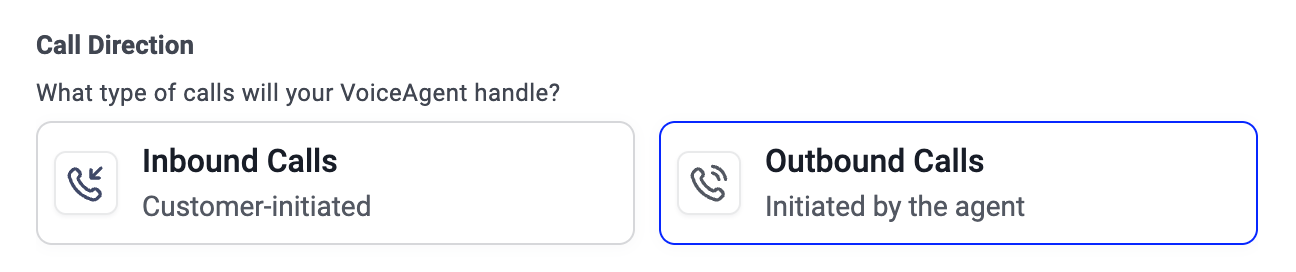
* **An Outbound VoiceAgent configured** in your account. This can be created by:
* selecting a **template** that includes **Outbound Call Direction**
* creating a **Custom VoiceAgent** and selecting **Outbound Call Direction**.
Implementation
Rather than starting calls manually, **outbound VoiceAgent calls are initiated through [the CloudTalk API](/developers#tag/Voice-Agents)**[,](/developers#tag/Voice-Agents) typically as part of a workflow automation using:
* **HubSpot Workflows**
* **Zapier**
* **Make**
* **Your internal systems**
* **Webhook-based automations**
Configure your [API Request](/developers#tag/Voice-Agents) following these instructions:
1. In the tool of your choice **define the API Request Endpoint.** Start by specifying the target endpoint for the request:
```http theme={"system"}
POST https://api.cloudtalk.io/v1/voice-agent/calls
```
2. In the headers of configuration **configure Authorization header.**
```
Authorization: Basic BASE64(api_key_id:api_key)
```
Cloudtalk API is using Basic Authentication, where
* `api_key_id` : is your API Key ID from **CloudTalk Dashboard > Settings > API Keys > API Key Detail > ID**
* `api_key` is your raw API key from **CloudTalk Dashboard > Settings > API Keys > API Key Detail > Key**
3. In the request body, configure required fields.
1. *call\_number* - Phone number to be called by voiceagent **in E.164 format**
2. *voice\_agent\_id -* The ID of the VoiceAgent. You can retrieve it in the **CloudTalk Dashboard → VoiceAgents -> Agents**. Open the detail of the desired VoiceAgent, and copy the ID from the **URL** of that page.
3. *call\_properties* containing
1. *system\_prompt* variables - passed to the VoiceAgent's system prompt and visible to the AI during the call. Use them to personalize the call (e.g., `#{{name}}`, `#{{order_id}}`). **Only required if you use variables in the VoiceAgent configuration.**
2. *output variables -* included in the Call Analysis Webhook payload.
⚠️ Only include *system\_prompt* object and *output* object in the API request if you are actually using variables in the VoiceAgent's prompt.
**Sample API Request:**
```bash theme={"system"}
curl \--location 'https://api.cloudtalk.io/v1/voice-agent/calls' \--header 'Content-Type: application/json' \--header 'Authorization: Basic dfjag57df********f5gdf4gs4dgd' \--data '{ "call_number": "+421 903 123 123", "voice_agent_id": "67eaa636148d700a8dmckaf1", "call_properties": { "system_prompt": { "variables": { "name": "John" } }, "output": { "variables": { "customer_id": 12345 } } }}'
```
***
Understanding System Prompt Variables vs. Output Variables
When configuring a VoiceAgent call via API, you can include two types of variables to enrich the conversation and support post-call processing:
* **system prompt variables**
* **output variables**.
These variables serve different purposes in the VoiceAgent workflow and should be used accordingly.
System Prompt Variables
⚠️ **Contact variables do not work on outbound agents.** Variables such as `#{{contact.name}}` or `#{{caller_number}}` are auto-populated for inbound agents only. For outbound agents, you define your own custom variables and pass their values in the API request, as described below. See [VoiceAgents for Inbound Calls](/en/articles/11399385-voiceagents-for-inbound-calls) for inbound personalization.
**System prompt variables** are visible to the AI during the call and help personalize the conversation or provide essential context for the VoiceAgent. Insert variables into your prompt using double curly brackets (`#{{ }}`).
Greeting Example*:*
```
Hello #{{name}}, I'm calling to confirm your order number #{{order_id}} placed on #{{order_date}}.
```
When sending the API request, make sure these variables are included in the `system_prompt.variables` object in the request body. For instance:
```
"system_prompt": {
"variables": {
"name": "Alex",
"order_id": "123456",
"order_date": "2025-05-18"
}
}
```
If a variable is referenced in the prompt but **not** passed in the API request, the VoiceAgent will not be able to use it, which may result in errors or a degraded user experience.
Output Variables
**Output variables** are **not visible to the AI during the call**. Instead, they are used to attach metadata or context to the conversation that will be available in the **call analysis and information extract** after the call ends.
These variables are submitted with the API request and are included in the webhook payload, allowing your systems to process the call outcome with full context, even though the VoiceAgent did not use this data in the conversation.
*Example*
Let's say your **[Extract Information](/en/articles/14072758-voiceagent-skills#h_d5557cb8f7)** skill is set up like this:
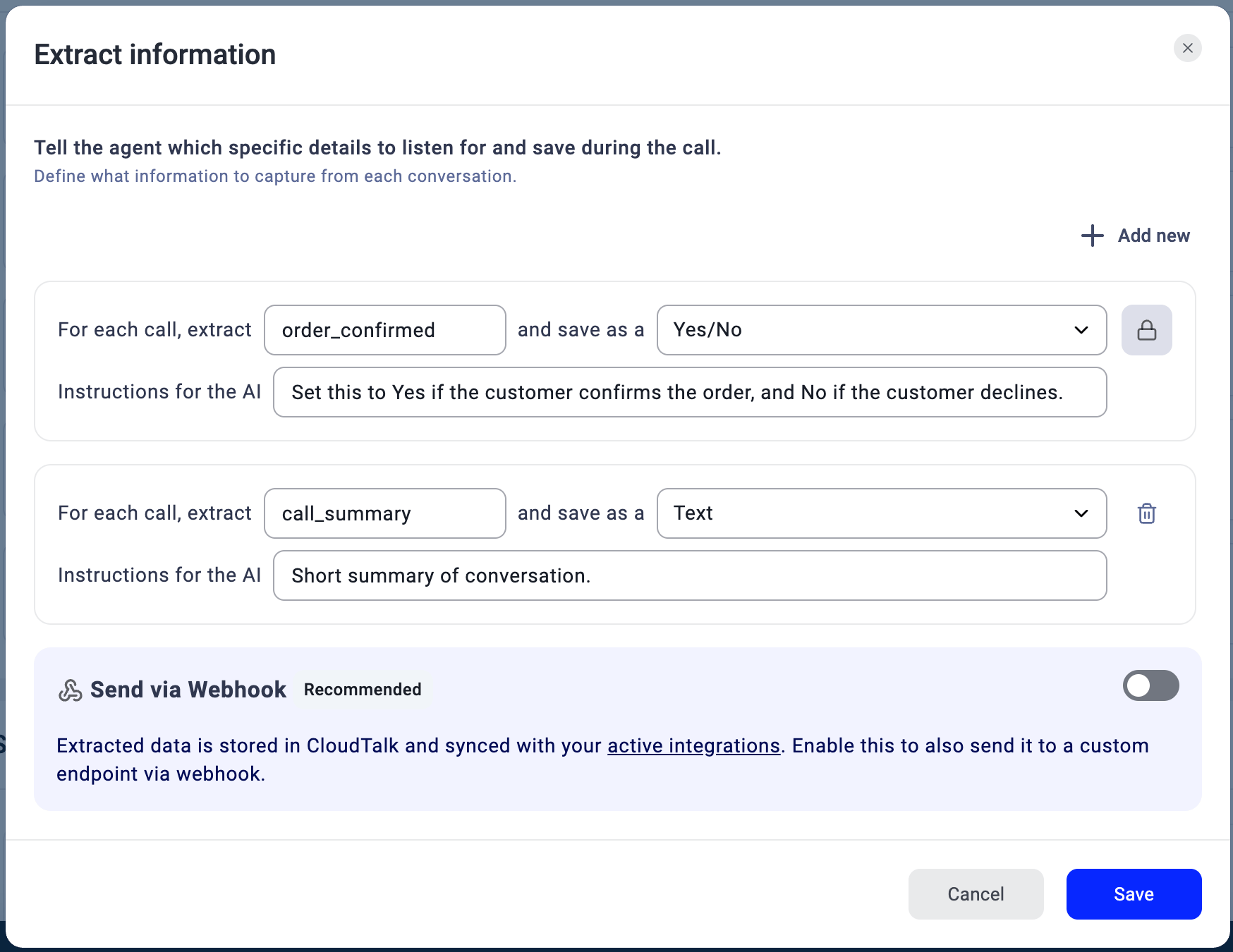 In your API request, you include an **output variable** to pass along external context (in this case `customer_id`):
```
"output": { "variables": { "customer_id": 12345 }}
```
This value is **not visible to the VoiceAgent during the call**, but it is included in the **webhook payload** sent after the call ends. The full webhook payload looks like this:
```json theme={"system"}
{ "data": { "ct_call_context": { "uuid": "160f677d-d2f2-419d-822d-b45f33e4fe6c", "status": "Connected", "datetime": "2026-06-17T08:38:31Z", "duration": 23 }, "message_left_by_caller": { "caller_name": null, "content": null }, "customer_id": 12345, "Summary": "The caller confirmed they want a callback tomorrow morning.", "Callback_Confirmed": true }}
```
💡 Every webhook payload now includes a `ct_call_context` object with the call UUID, status, start time, and duration. You can use the `uuid` field to look up the call in CloudTalk or match it with records in your CRM or data warehouse. See [VoiceAgent Skills – Extract Information](/en/articles/14072758-voiceagent-skills#h_364d85c8dd) for the full payload reference.
This allows you to enrich post-call automation or reporting with additional context that was never part of the spoken conversation.
By combining both types of variables, you can create highly personalized conversations during the call and maintain full operational context afterward - without overloading the AI with unnecessary data.
***
*Need help or have a question?* Just reach out through our [Support portal](https://support.cloudtalk.io/hc/en-us/requests/new?ticket_form_id=26305535257884) — we're here for you.
## Related topics
- [Stop outbound VoiceAgent calls](/api-reference/voiceagent/stop-outbound-voiceagent-calls.md)
- [TCPA Compliance for VoiceAgent Outbound Calls](/en/articles/17230144-tcpa-compliance-for-voiceagent-outbound-calls.md)
- [VoiceAgents for Inbound Calls](/en/articles/11399385-voiceagents-for-inbound-calls.md)
This documentation is built and hosted on [Mintlify](https://mintlify.com), a developer documentation platform.
In your API request, you include an **output variable** to pass along external context (in this case `customer_id`):
```
"output": { "variables": { "customer_id": 12345 }}
```
This value is **not visible to the VoiceAgent during the call**, but it is included in the **webhook payload** sent after the call ends. The full webhook payload looks like this:
```json theme={"system"}
{ "data": { "ct_call_context": { "uuid": "160f677d-d2f2-419d-822d-b45f33e4fe6c", "status": "Connected", "datetime": "2026-06-17T08:38:31Z", "duration": 23 }, "message_left_by_caller": { "caller_name": null, "content": null }, "customer_id": 12345, "Summary": "The caller confirmed they want a callback tomorrow morning.", "Callback_Confirmed": true }}
```
💡 Every webhook payload now includes a `ct_call_context` object with the call UUID, status, start time, and duration. You can use the `uuid` field to look up the call in CloudTalk or match it with records in your CRM or data warehouse. See [VoiceAgent Skills – Extract Information](/en/articles/14072758-voiceagent-skills#h_364d85c8dd) for the full payload reference.
This allows you to enrich post-call automation or reporting with additional context that was never part of the spoken conversation.
By combining both types of variables, you can create highly personalized conversations during the call and maintain full operational context afterward - without overloading the AI with unnecessary data.
***
*Need help or have a question?* Just reach out through our [Support portal](https://support.cloudtalk.io/hc/en-us/requests/new?ticket_form_id=26305535257884) — we're here for you.
## Related topics
- [Stop outbound VoiceAgent calls](/api-reference/voiceagent/stop-outbound-voiceagent-calls.md)
- [TCPA Compliance for VoiceAgent Outbound Calls](/en/articles/17230144-tcpa-compliance-for-voiceagent-outbound-calls.md)
- [VoiceAgents for Inbound Calls](/en/articles/11399385-voiceagents-for-inbound-calls.md)
This documentation is built and hosted on [Mintlify](https://mintlify.com), a developer documentation platform.